
|
Denise and Louise discuss how to use quote marks (or speech marks) in writing ... and when not to use them.
Click to listen to Season 2, Episode 10
Summary
Listen to find out more about:
Other resources
Music credit ‘Vivacity’ Kevin MacLeod (incompetech.com). Licensed under Creative Commons: By Attribution 3.0 License.
Louise Harnby is a line editor, copyeditor and proofreader who specializes in working with crime, mystery, suspense and thriller writers.
She is an Advanced Professional Member of the Chartered Institute of Editing and Proofreading (CIEP), a member of ACES, a Partner Member of The Alliance of Independent Authors (ALLi), and co-hosts The Editing Podcast. Visit her business website at Louise Harnby | Fiction Editor & Proofreader, say hello on Twitter at @LouiseHarnby, connect via Facebook and LinkedIn, and check out her books and courses.
2 Comments
In this episode of The Editing Podcast, Denise and Louise talk about adverbs, and how to use or remove them purposefully.
Click to listen to Season 2, Episode 4
Summary
Listen to find out more about:
Editing bites
Other resources
Music credit ‘Vivacity’ Kevin MacLeod (incompetech.com). Licensed under Creative Commons: By Attribution 3.0 License http://creativecommons.org/licenses/by/3.0/
Louise Harnby is a line editor, copyeditor and proofreader who specializes in working with crime, mystery, suspense and thriller writers.
She is an Advanced Professional Member of the Chartered Institute of Editing and Proofreading (CIEP), a member of ACES, a Partner Member of The Alliance of Independent Authors (ALLi), and co-hosts The Editing Podcast. Visit her business website at Louise Harnby | Fiction Editor & Proofreader, say hello on Twitter at @LouiseHarnby, connect via Facebook and LinkedIn, and check out her books and courses.
In this episode of The Editing Podcast, Denise and Louise discuss four different kinds of writers and how identifying what kind you are can help you work out the kind of editing that’s the best fit for you.
Click to listen to Season 2, Episode 2
Summary
Listen to find out more about:
Editing bites
Music credit ‘Vivacity’ Kevin MacLeod (incompetech.com). Licensed under Creative Commons: By Attribution 3.0 License http://creativecommons.org/licenses/by/3.0/
Louise Harnby is a line editor, copyeditor and proofreader who specializes in working with crime, mystery, suspense and thriller writers.
She is an Advanced Professional Member of the Chartered Institute of Editing and Proofreading (CIEP), a member of ACES, a Partner Member of The Alliance of Independent Authors (ALLi), and co-hosts The Editing Podcast. Visit her business website at Louise Harnby | Fiction Editor & Proofreader, say hello on Twitter at @LouiseHarnby, connect via Facebook and LinkedIn, and check out her books and courses.
In this episode of The Editing Podcast, Denise and Louise discuss how to prepare your book file for editing ... whether you're doing it yourself or working with an editor.
Click to listen to Season 2, Episode 1
Summary
Listen to find out more about:
Editing bites
Other resources
Music credit ‘Vivacity’ Kevin MacLeod (incompetech.com). Licensed under Creative Commons: By Attribution 3.0 License http://creativecommons.org/licenses/by/3.0/
Louise Harnby is a line editor, copyeditor and proofreader who specializes in working with crime, mystery, suspense and thriller writers.
She is an Advanced Professional Member of the Chartered Institute of Editing and Proofreading (CIEP), a member of ACES, a Partner Member of The Alliance of Independent Authors (ALLi), and co-hosts The Editing Podcast.
Are you spending too much time on your novel’s text design? Here’s how to use the Styles function in Microsoft Word to ensure the various elements are formatted consistently.
In this article, I’ll walk you through the following:
What is the Styles tool? The Styles tool allows you to apply design consistency to the various text elements in your book. In a novel, you might want to create different styles for the following:
Microsoft Word has a handy suite of on-board styles, though it’s unlikely they’ll match your specific requirements. Modifying these is still a little quicker than creating fresh styles so take a look at the properties and work out what you’ll retain and what you’ll change. What properties can you influence? You can influence every property of your text when you assign a style to it. However, in a novel, you’ll most likely focus on the following:
How to access the Styles tool There are two ways to access the Styles function onscreen:
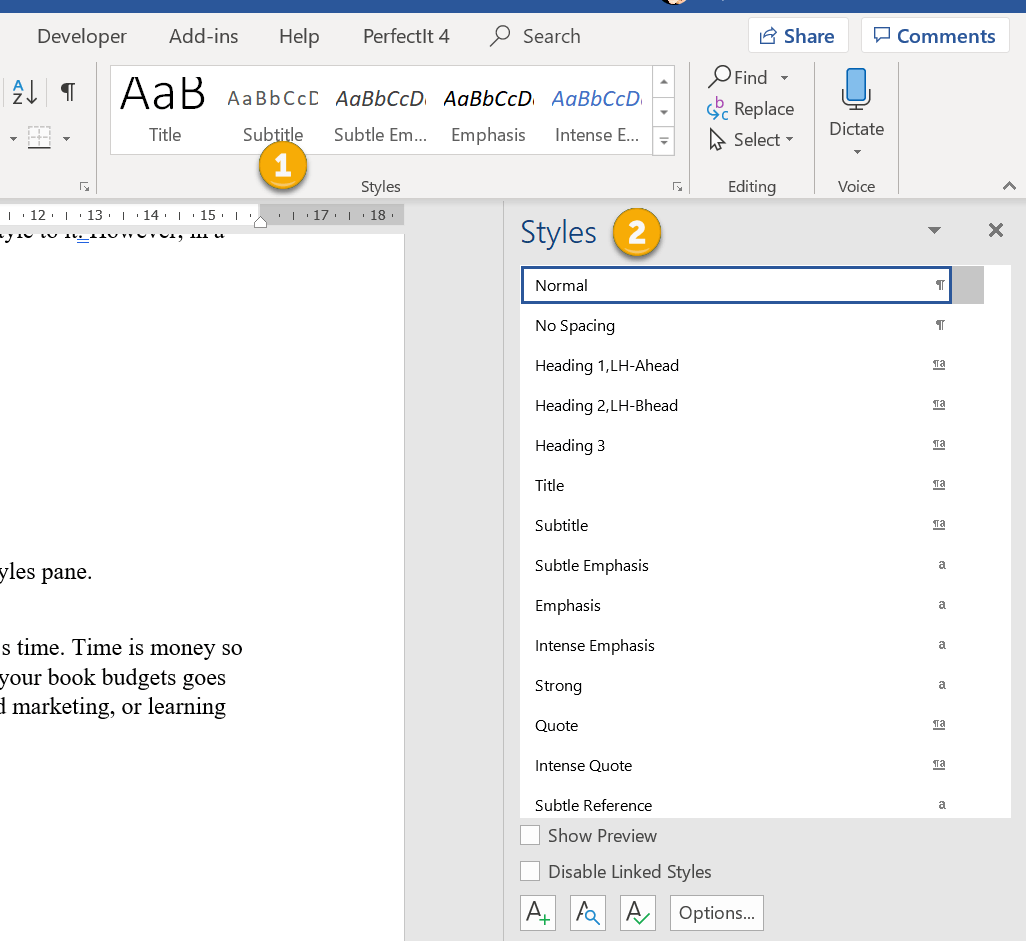
The gallery in the ribbon offers a preview of how the style appears. If I’m working with a lot of different text elements in a document, I find these visual clues useful when I want to locate a style quickly.
On smaller screens, less of the Styles gallery will be visible. To access the previews of all the styles in your gallery, click on the MORE arrow (circled). 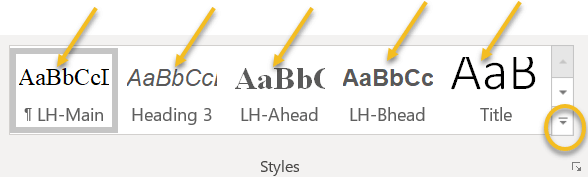
A new window will appear containing the full gallery.
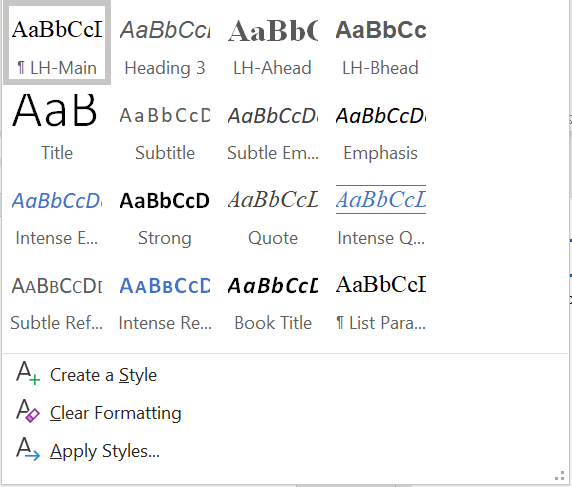
Why you should format with styles
Using styles gives you control over design, consistency and formatting time. Time is money, so when you do the job instead of asking other professionals to do it, your book budgets goes further. Perhaps you can invest a little more time or money on cover design, sales and marketing, or learning how to improve writing craft. Can you format manually? Of course, but you could be making a lot of unnecessary work for yourself. Scenario 1 You complete the writing, drafting, and editing, and get cracking on designing the layout. Now that there are 85,000 words in place, your thriller’s looking more like a textbook thanks to the font you’ve chosen for your main text: Arial 14. A serif font like Times New Roman would be easier on your reader’s eye. The problem is, you can’t select all the text in the file with CTRL A and change it in one fell swoop because that would affect the chapter headings and the emails your transgressor is sending to the police, all of which are formatted differently. Instead, you have to work through the file, locate the main text elements manually, and change the font. If, however, you’ve assigned a style to your main text, you can modify that font property in just a few clicks. The change will automatically change all the main text, and only that element, to your new font. Further down, I’ll show you how. Scenario 2 You’ve written 12 additional paragraphs for your book but they’re in another document. You copy and paste the writing into your book file. Now you have to manually format the new sections so that they match the existing work. If you’ve assigned styles, however, it’s as simple as cut, paste and left-click. Job done. How to create a style There are several ways to create a style in Word:
1A. Manual method Open the styles pane and left-click on the A+ button in the bottom-left-hand corner. 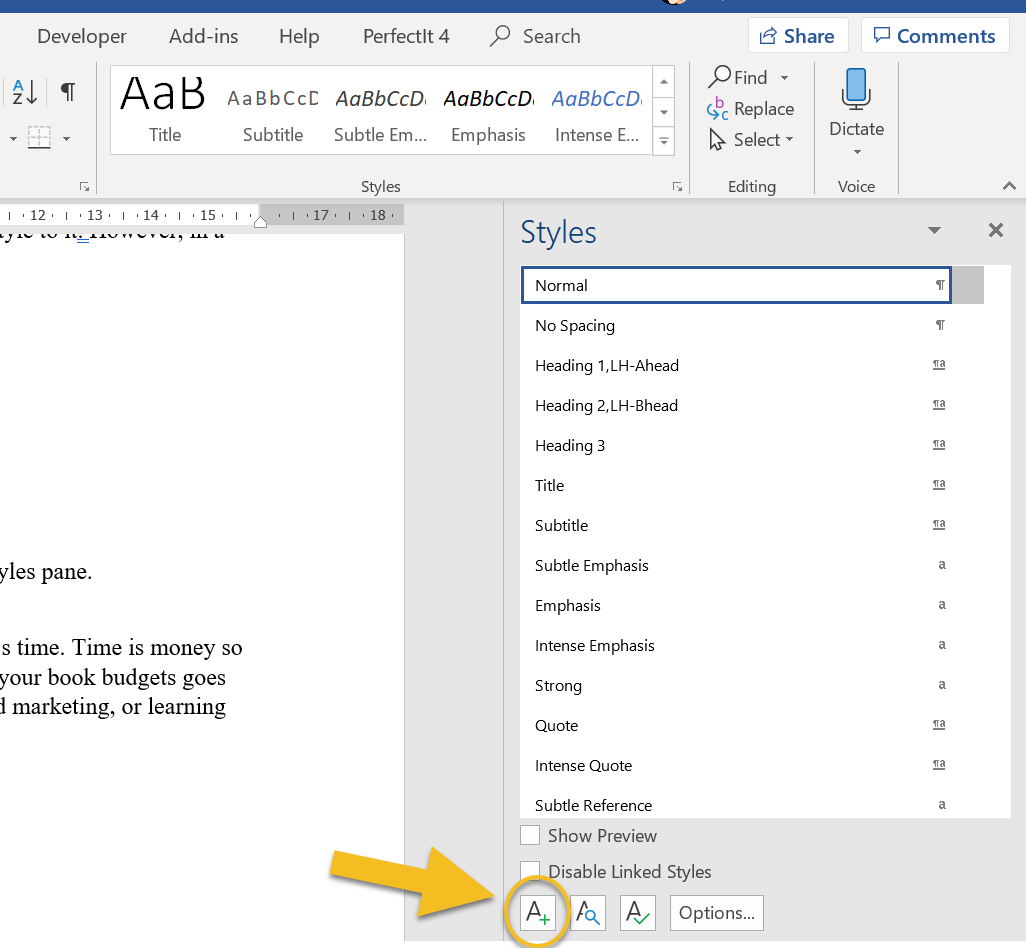
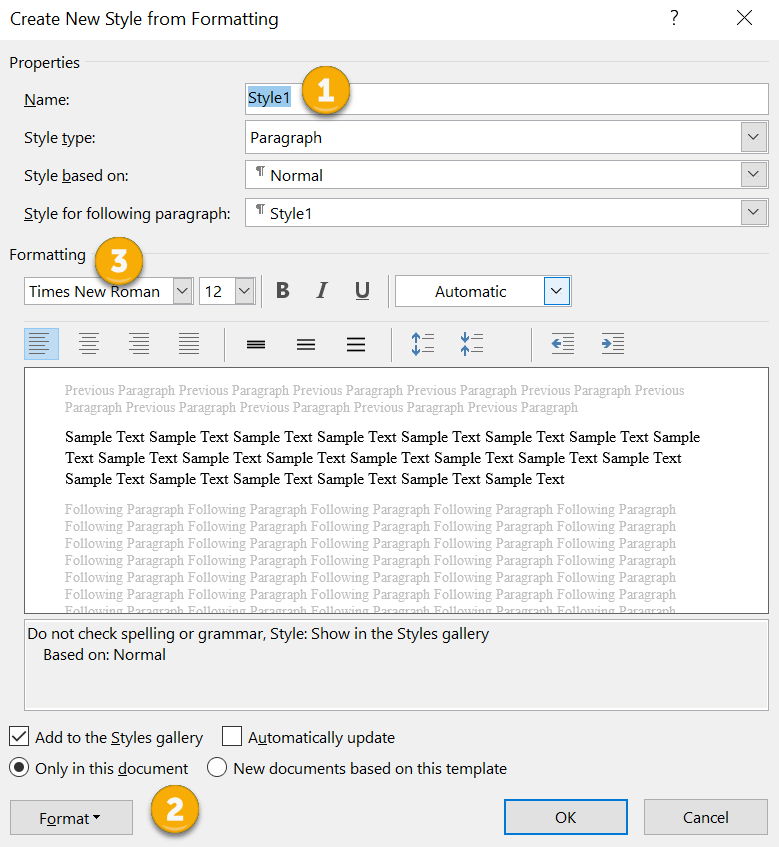
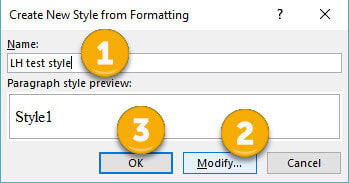
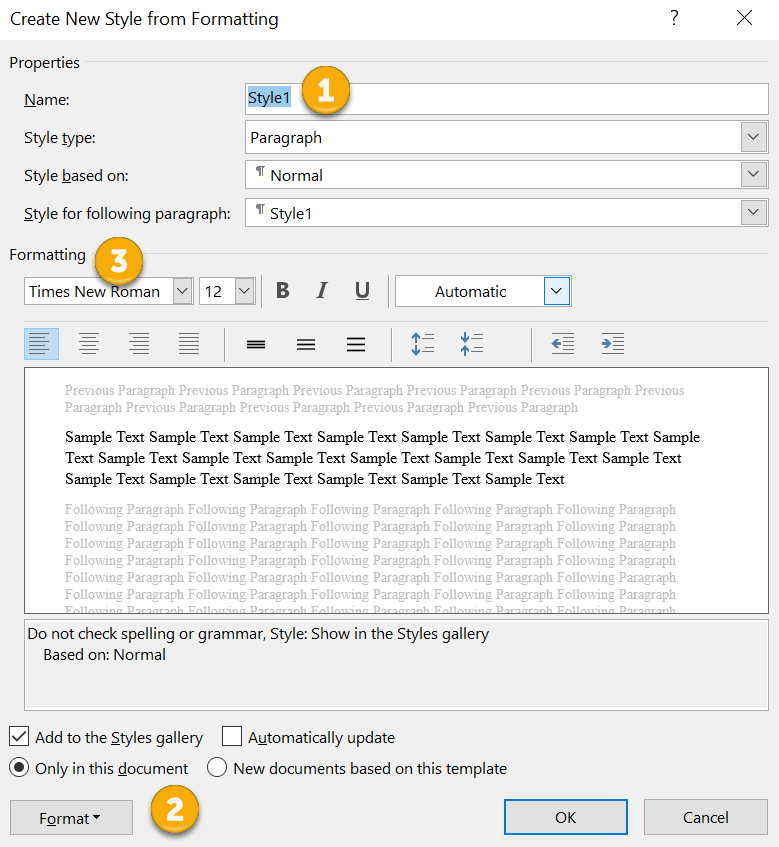
A new window will open (CREATE NEW STYLE FROM FORMATTING). Now you can give your style a name (1) and assign properties to the font, paragraph spacing and page flow (2 and 3).
1B. Manual method B
Alternatively, right-click on a piece of text that’s already formatted according to your preferences. A mini toolbar will appear. Click on the Styles button. 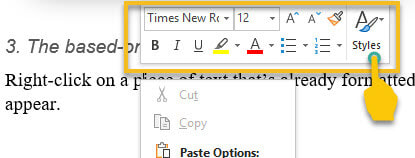
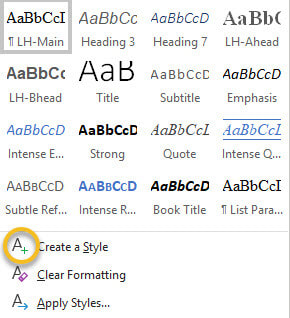
A new window will appear. Left-click on CREATE A STYLE.
Name your style, modify if you wish, and left-click OK.
2. Updating method
Select a piece of text that’s already formatted according to your preferences. Now head up to the Styles gallery in the ribbon, or the Styles pane, and right-click on an unused style that you’re happy to update. Hover over UPDATE [STYLE] TO MATCH SELECTION, then left-click. 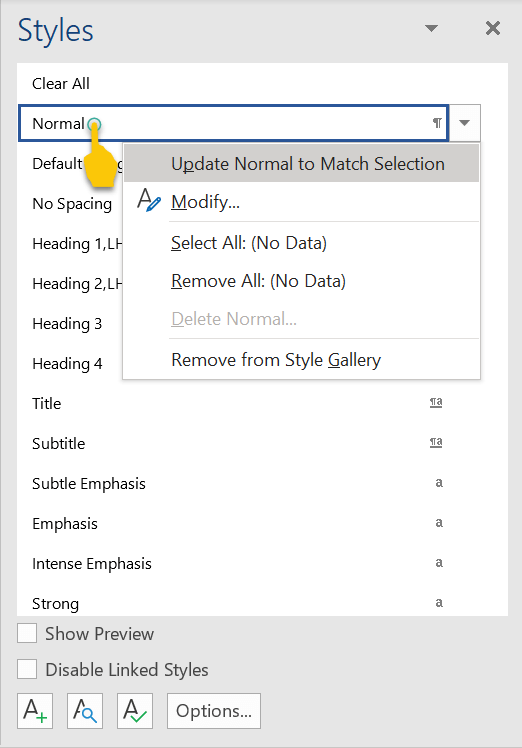
How to modify a style
There are two ways to modify a style in Word:
1. Styles gallery Go to the Styles gallery in the ribbon and right-click on the style you want to modify. 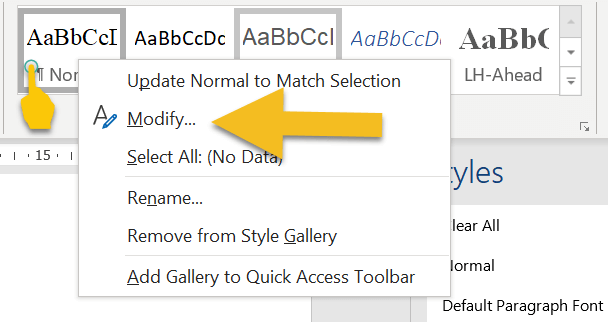
Left-click on MODIFY and amend the properties of your style. Note that this will change every piece of text assigned with that style.
2. Styles pane
Go to the Styles pane on the right-hand side of your screen and right-click on the style you want to modify. 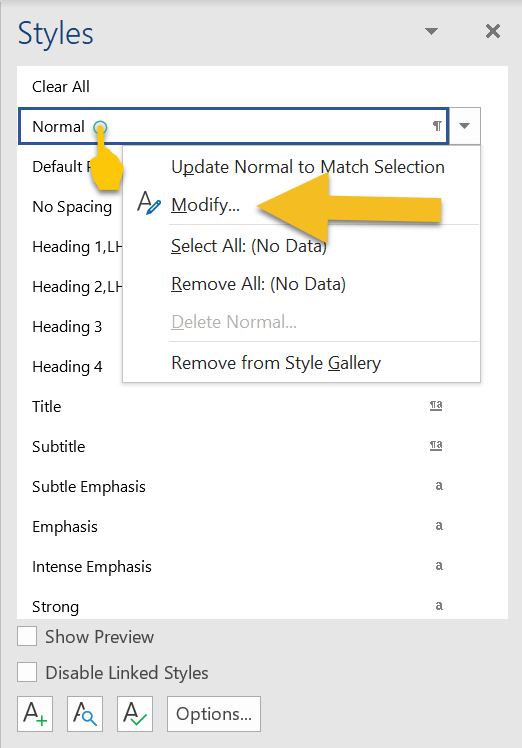
Left-click on MODIFY and amend the properties of your style. Again, bear in mind that this will change every piece of text with that style assigned.
How to assign a style to an element of text If a piece of text isn’t formatted correctly, left-click the cursor on a word or in a paragraph, or select it by double-clicking. Now head up to the Styles gallery in the ribbon, or the Styles pane, and left-click on the preferred style. Your style will be assigned. If you’re working on a smaller screen, you’ll probably find it easier to use the Styles gallery in the ribbon because it takes up less space than the Styles pane. To close the Styles pane and free up some screen real-estate, left-click on the X in the top-right-hand corner. 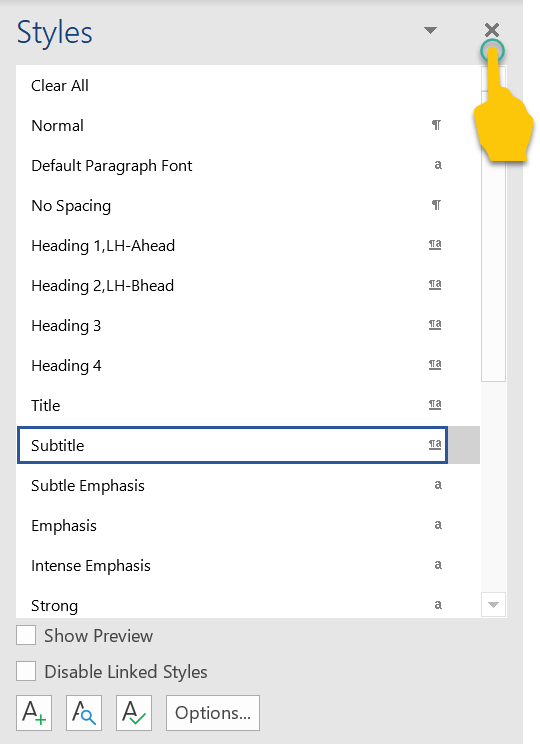
Troubleshooting
Here’s how to fix some of the more common problems that arise when working with styles. 1. Styles gallery or pane isn’t visible If the Styles gallery isn’t visible, make sure you’re in the HOME tab in the ribbon. 
If the Styles pane isn’t visible, left-click on the small arrow in the Styles gallery.
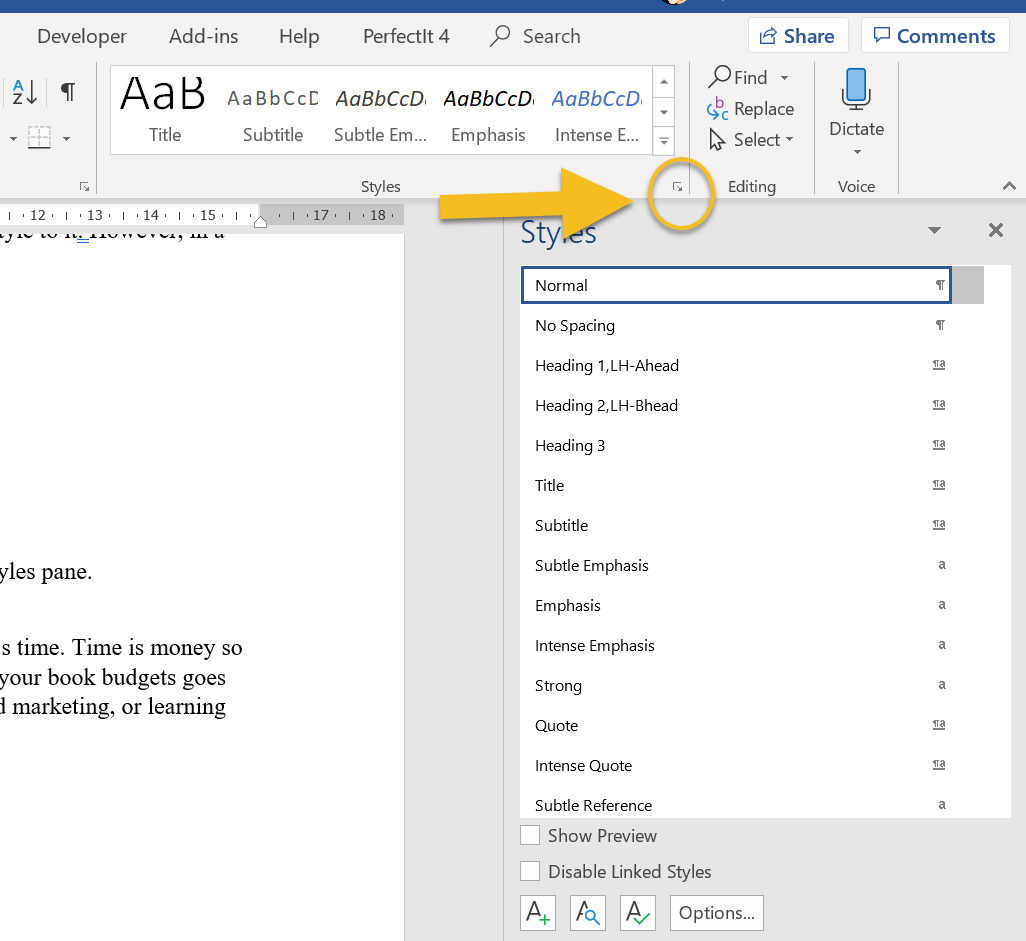
2. Style not showing in gallery
If you’ve created a style and it’s not showing in gallery, head to the Styles pane and right-click on the missing style. This opens the MODIFY pane. Make sure that the ADD TO THE STYLES GALLERY box is checked. 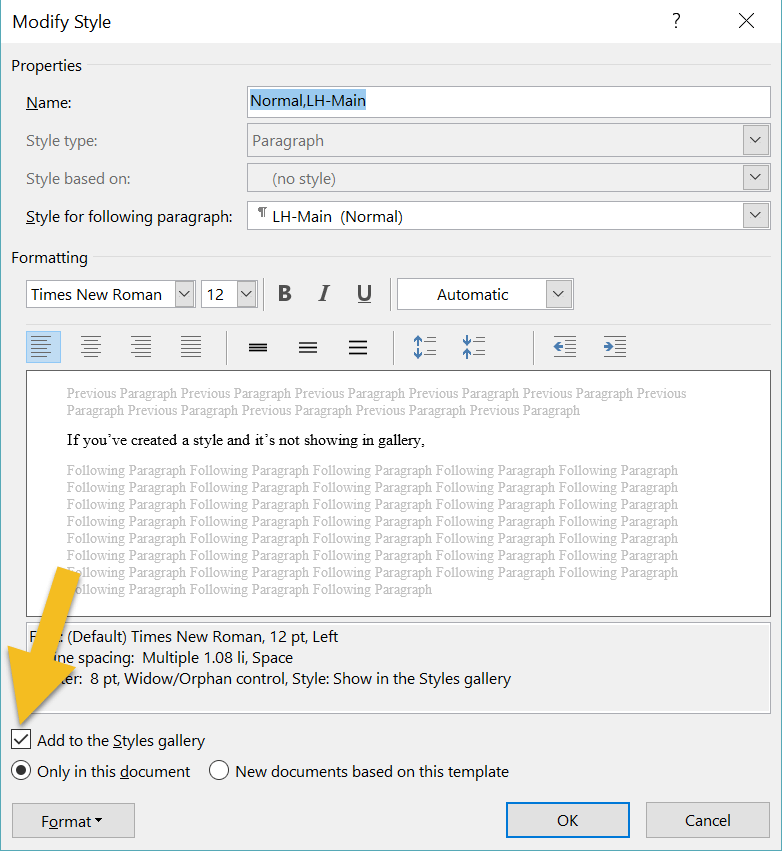
3. The gallery is cluttered with unused styles
If your gallery is busy with styles you don’t need to access, there are two ways to remove them. The quickest method is to right-click on an unwanted style, then left-click on REMOVE FROM STYLE GALLERY. 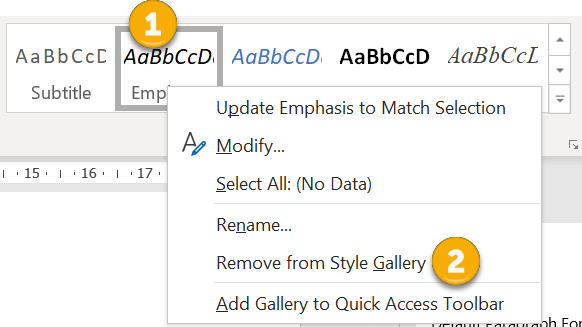
An alternative is to right-click on the unwanted style and left-click on MODIFY. Then uncheck the ADD TO THE STYLES GALLERY box.
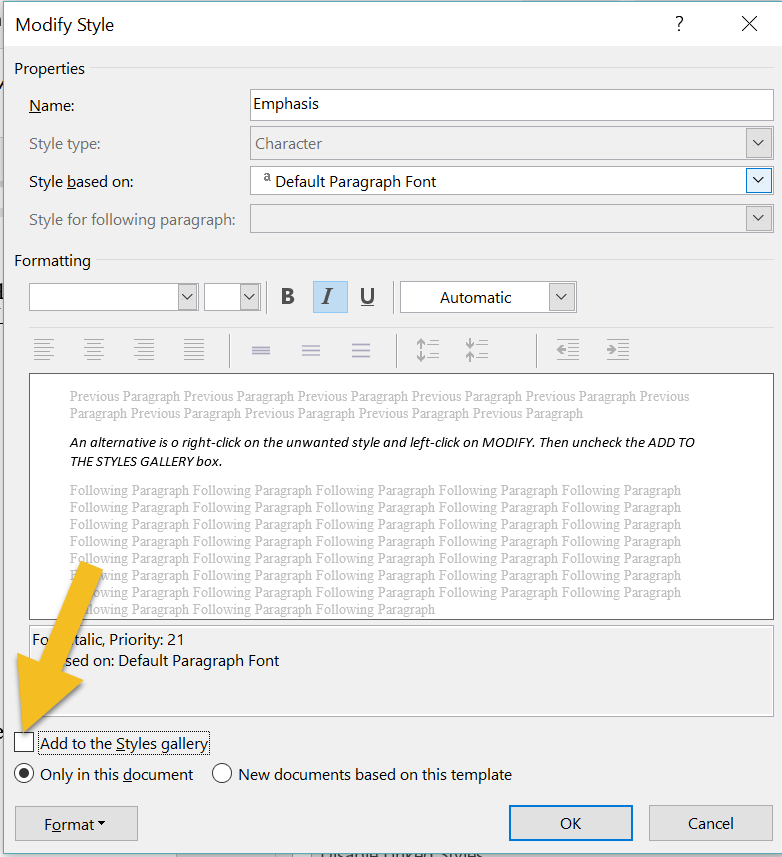
4. You’ve renamed a style but Word’s default name is still displayed in the pane
If you’re using the Styles pane to apply styles, the list might appear cluttered if Word’s default names are displaying, even though you've modified them. To fix, left-click on the OPTIONS button. 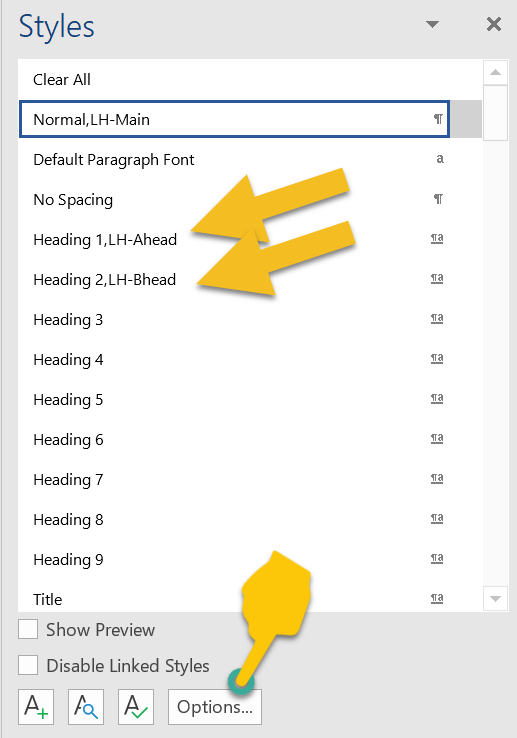
Check the HIDE BUILT-IN NAME WHEN ALTERNATE EXISTS box, then left-click on OK.
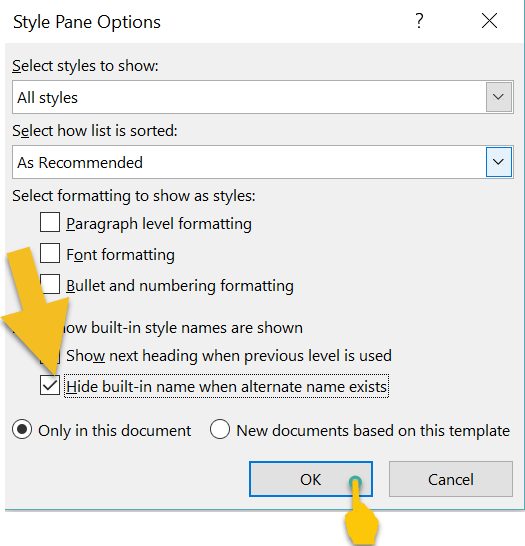
Your list will now display with your modified names.

Heading styles and navigating your Word file
One of the advantages of using the Styles tool for a novel is navigation. To access the Navigation pane, press CTRL F on a PC. Now, left-click on the HEADINGS tab. Any style based on one of the in-built heading styles will show up in the menu. 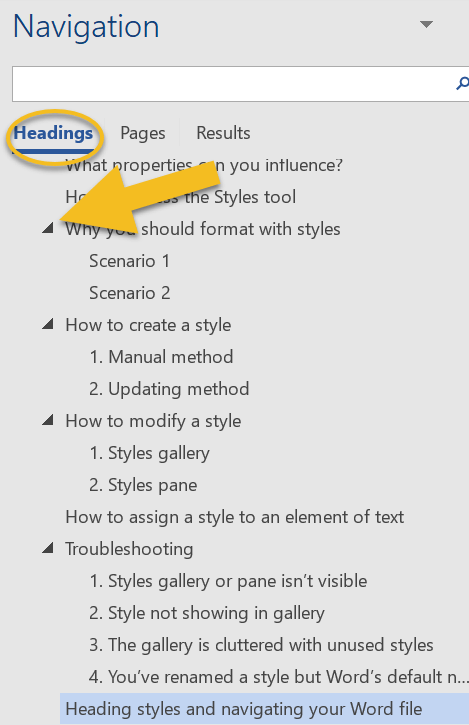
I use this function when I’m editing and want to check that chapter headings (and subheadings) are formatted consistently, assigned the correct level of priority, and numbered chronologically.
Headings with arrows next to them indicate lower-level subheadings. You can expand or collapse subheadings by left-clicking on the arrows. Furthermore, if you want to shift a headed or subheaded section to another position in your document, left-click on the relevant heading and drag up or down the menu. Summing up Styles let you focus on your writing rather than fretting about internal text design. Applying a style to an element of your book file takes a fraction of the time required for manual formatting. And because any style can be tweaked, you get to change your mind as often as you like. If you have any problems with using Word’s Styles gallery and pane, drop me a note in the comments and I’ll do my best to fix the issue. Fancy watching a video tutorial? Visit my YouTube channel and watch: Self-editing Your fiction in Word: How to Use Styles.
Louise Harnby is a line editor, copyeditor and proofreader who specializes in working with crime, mystery, suspense and thriller writers.
She is an Advanced Professional Member of the Chartered Institute of Editing and Proofreading (CIEP), a member of ACES, a Partner Member of The Alliance of Independent Authors (ALLi), and co-hosts The Editing Podcast. Visit her business website at Louise Harnby | Fiction Editor & Proofreader, say hello on Twitter at @LouiseHarnby, connect via Facebook and LinkedIn, and check out her books and courses.
Semi-colons are disliked by some, misused by others, and avoided by many. If you want to keep them out of your writing, that’s fine. In this article, I show you how they work conventionally. That way, you can omit them because that’s your preference, not because you daren’t include them!
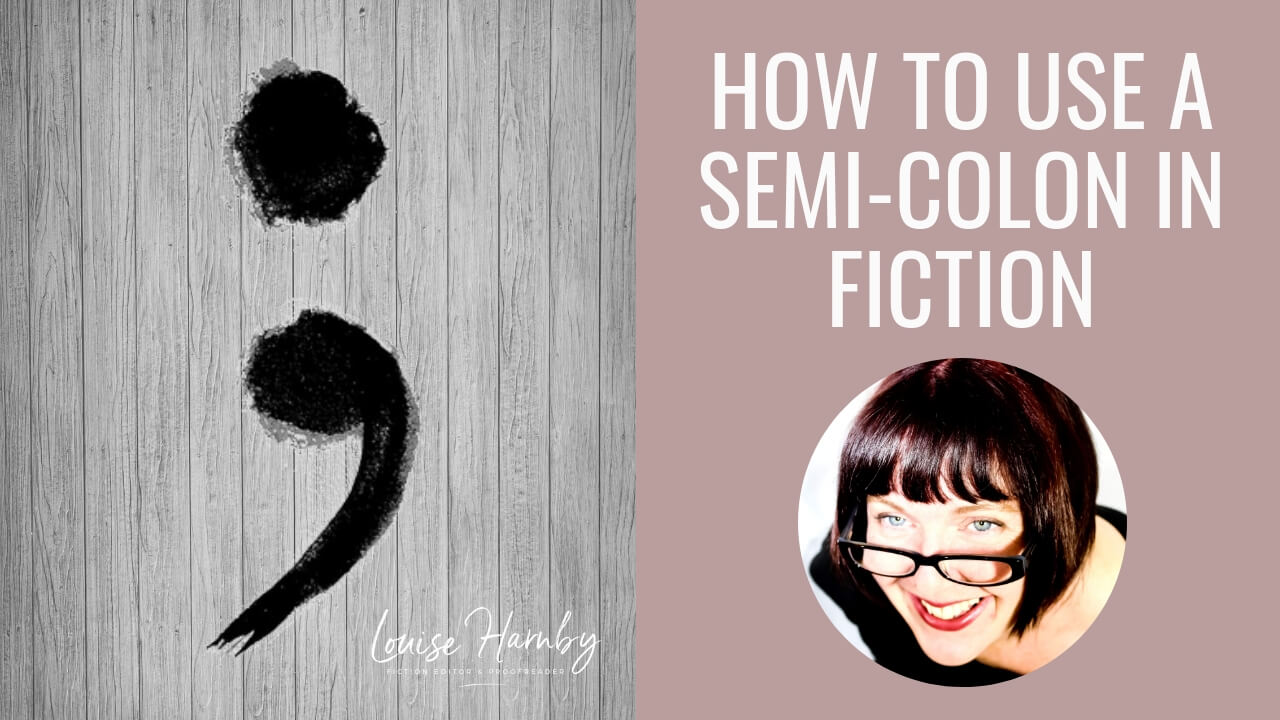
What is a semi-colon?
It’s one of these: ;3 ways to use a semi-colon There are 3 situations in which you’re likely to use a semi-colon in fiction:
Here, I focus on parallelism and clarity, but sentence pacing comes into play too – a useful addition to any fiction writer’s toolbox. A little bit of grammar Above, I mentioned independent clauses. An independent clause is a group of words that contains a subject and a predicate. In case you don’t know what they are – and many writers know how to write extremely well without knowing grammar terminology so there’s no shame in that – here’s an overview. Subject A subject is the thing in a sentence that’s doing something or being something. In the examples below, the subject is in bold.
If you’re not sure what the subject of your sentence is, try this trick: change the subject into a question that you can answer yes/no to, as in the examples below.
Predicate
A predicate is the part of a sentence that contains a verb and that tells us something about what the subject’s doing or what they are. In the examples below, the predicate is in bold.
If you’re not sure what the predicate is in a sentence that’s a question, turn it into a statement, as in the example below. The result might be clunky but it’ll show you what’s what. The subject is in bold and the predicate in italic.
Independent clauses
Quick recap: an independent clause is a group of words that contains a subject and a predicate. The subject is in bold, the predicate is in italic, and the full independent clause is in red.
Parallelism and the semi-colon Take a look at these two independent clauses.
The second sentence is related to the first because the gravel that’s digging into the agent’s elbows is what she experiences after falling to the ground. We can therefore use a semi-colon to indicate this relationship, if we wish.
Note that the first word of the clause after the semi-colon does not take an initial capital letter. Could we use a colon? A colon is non-standard because colons introduce additional/qualifying information about the first clause, not new information. Think of the information they introduce as subordinate, if it helps. I recommend avoiding colons to join parts of a sentence that are equally weighted.
Could we use a comma?
A comma is non-standard when joining two independent clauses. Sentences using commas in this way are said to contain comma splices. I recommend avoiding this usage.
Clarity and the semi-colon
Heavily punctuated sentences can be confusing and clunky. For the reader, it can mean limping through your prose rather than moving at a pace dictated by narrative intent. Take a look at this example from Mick Herron’s Dead Lions, p. 88. There are two semi-colons in the original version, but for this example I’m focusing only on the first (see the section in bold).
1. Amended with en dash
He was bald, or mostly bald – a crop of white stubble gilded his ears – and gave off an air of pent-up energy, of emotions kept in check – the same sense Lamb had had watching the video of him, shot eighteen years ago, through a two-way mirror in one of Regent’s Park’s luxury suites. Joke. These were underground, and were where the Service’s more serious debriefings took place; those which it might later prove politic to deny had happened. 2. Amended with comma He was bald, or mostly bald – a crop of white stubble gilded his ears – and gave off an air of pent-up energy, of emotions kept in check, the same sense Lamb had had watching the video of him, shot eighteen years ago, through a two-way mirror in one of Regent’s Park’s luxury suites. Joke. These were underground, and were where the Service’s more serious debriefings took place; those which it might later prove politic to deny had happened. The en dash in the first alternative version looks awkward because we already have two parenthetical en dashes in play. What happens if we introduce a comma instead? The sentence is already comma-heavy. All we’ve done is bring in yet another to muddy the waters. The semi-colon works best. It effectively links the clauses it connects, but in a way that subdivides the sentence clearly. However, pacing comes into place here too. There’s more on pacing below but, for now, compare the original and the version amended with a comma. The creepy voyeurism is starker when set off by the semi-colon. More on pacing and the semi-colon The semi-colon is harder than the comma. It lengthens the pause or increases the distance between two clauses that could have been linked with a comma, making them both stand out. The semi-colon is softer than the full point. It shortens the pause or reduces the distance between two clauses that could have been linked with a full point, indicating a stronger, more intimate relationship. Back to Herron for a closer look at the second semi-colon (see the section in bold) and some alternatives we could try:
Original
He was bald, or mostly bald – a crop of white stubble gilded his ears – and gave off an air of pent-up energy, of emotions kept in check; the same sense Lamb had had watching the video of him, shot eighteen years ago, through a two-way mirror in one of Regent’s Park’s luxury suites. Joke. These were underground, and were where the Service’s more serious debriefings took place; those which it might later prove politic to deny had happened.
1. Amended with comma
He was bald, or mostly bald – a crop of white stubble gilded his ears – and gave off an air of pent-up energy, of emotions kept in check; the same sense Lamb had had watching the video of him, shot eighteen years ago, through a two-way mirror in one of Regent’s Park’s luxury suites. Joke. These were underground, and were where the Service’s more serious debriefings took place, those which it might later prove politic to deny had happened. In the original, the semi-colon acts as a super-comma, subdividing the whole sentence into two more readable chunks. However, more marked is the impact on the pace. The semi-colon forces us to slow down. That’s important because the clause that comes after it is about the denial of interrogations. The semi-colon makes us pause a little longer, which makes the sinister information that follows stand out. Semi-colons and dialogue Some authors resist the use of semi-colons in dialogue, usually on the grounds that the reader can’t hear the punctuation. Does that mean you shouldn’t use them? A novel’s dialogue isn’t real-life speech; it’s a representation of it. Speech, like narrative, has rhythm. The writer’s job is to create speech that’s clear and well paced. If a semi-colon helps you to do that, why wouldn’t you use it? Here’s a great example from David Rosenfelt’s New Tricks, p. 316:
Both versions work but Rosenfelt elects to use a semi-colon because he wants to show the relationship between the two independent clauses. A full point would pull the clauses a little further apart and reduce the intimacy between them. Should you use semi-colons in your fiction? Some authors prefer to omit semi-colons for a variety of reasons: they're deemed pretentious, confusing, interruptive or ugly. But I’m not sure we should judge them so harshly:
Further reading and cited works
Louise Harnby is a line editor, copyeditor and proofreader who specializes in working with crime, mystery, suspense and thriller writers.
She is an Advanced Professional Member of the Chartered Institute of Editing and Proofreading (CIEP), a member of ACES, a Partner Member of The Alliance of Independent Authors (ALLi), and co-hosts The Editing Podcast. Visit her business website at Louise Harnby | Fiction Editor & Proofreader, say hello on Twitter at @LouiseHarnby, connect via Facebook and LinkedIn, and check out her books and courses.
In this episode of The Editing Podcast, Denise and Louise discuss how long it takes to complete an edit – whether you’re doing it yourself or working with a professional – and how to plan ahead.
And check out the cheeky bloopers that Denise included of me messing up my words! I’ll get my revenge!
Click to listen to Episode 12
Summary of Episode 12
Listen to find out more about editing time in relation to:
Editing bites
Music credit ‘Vivacity’ Kevin MacLeod (incompetech.com). Licensed under Creative Commons: By Attribution 3.0 License http://creativecommons.org/licenses/by/3.0/
Louise Harnby is a line editor, copyeditor and proofreader who specializes in working with crime, mystery, suspense and thriller writers.
She is an Advanced Professional Member of the Chartered Institute of Editing and Proofreading (CIEP), a member of ACES, a Partner Member of The Alliance of Independent Authors (ALLi), and co-hosts The Editing Podcast. Visit her business website at Louise Harnby | Fiction Editor & Proofreader, say hello on Twitter at @LouiseHarnby, connect via Facebook and LinkedIn, and check out her books and courses. The Editing Podcast, Season 1, Episode 11: Does location matter when working with an editor?1/4/2019
In this episode of The Editing Podcast, Denise and Louise discuss location and whether where your editor lives actually matters.
Click to listen to Episode 11
Summary of Episode 11
Listen to find out more about:
Editing bites Music credit ‘Vivacity’ Kevin MacLeod (incompetech.com). Licensed under Creative Commons: By Attribution 3.0 License http://creativecommons.org/licenses/by/3.0/
Louise Harnby is a line editor, copyeditor and proofreader who specializes in working with crime, mystery, suspense and thriller writers.
She is an Advanced Professional Member of the Chartered Institute of Editing and Proofreading (CIEP), a member of ACES, a Partner Member of The Alliance of Independent Authors (ALLi), and co-hosts The Editing Podcast. Visit her business website at Louise Harnby | Fiction Editor & Proofreader, say hello on Twitter at @LouiseHarnby, connect via Facebook and LinkedIn, and check out her books and courses.
In this episode of The Editing Podcast, Denise and Louise discuss the order of play for the different levels of editing, and some ideas about how you can keep costs down.
Click to listen to Episode 9
Summary of Episode 9
Listen to find out more about:
Editing bites
Other resources
Music credit ‘Vivacity’ Kevin MacLeod (incompetech.com). Licensed under Creative Commons: By Attribution 3.0 License: http://creativecommons.org/licenses/by/3.0/
Louise Harnby is a line editor, copyeditor and proofreader who specializes in working with crime, mystery, suspense and thriller writers.
She is an Advanced Professional Member of the Chartered Institute of Editing and Proofreading (CIEP), a member of ACES, a Partner Member of The Alliance of Independent Authors (ALLi), and co-hosts The Editing Podcast.
In this episode of The Editing Podcast, Denise and Louise talk about about page proofs and the proofreading process.
Click to listen to Episode 8
Summary of Episode 8
Editing bites
Related resources Click on the image below to download my free proofreading checklist. 
And check out these blog articles about proofreading too:
Music credit ‘Vivacity’ Kevin MacLeod (incompetech.com). Licensed under Creative Commons: By Attribution 3.0 License: http://creativecommons.org/licenses/by/3.0/
Louise Harnby is a line editor, copyeditor and proofreader who specializes in working with crime, mystery, suspense and thriller writers.
She is an Advanced Professional Member of the Chartered Institute of Editing and Proofreading (CIEP), a member of ACES, a Partner Member of The Alliance of Independent Authors (ALLi), and co-hosts The Editing Podcast. Visit her business website at Louise Harnby | Fiction Editor & Proofreader, say hello on Twitter at @LouiseHarnby, connect via Facebook and LinkedIn, and check out her books and courses.
In this episode of The Editing Podcast, Denise and Louise talk about style sheets, and how they’ll help you keep track of the key themes in your book, and ensure consistency along the way.
Click to listen to Episode 7
Summary of Episode 7 ...
Related resources
Music credit ‘Vivacity’ Kevin MacLeod (incompetech.com). Licensed under Creative Commons: By Attribution 3.0 License: http://creativecommons.org/licenses/by/3.0/
Louise Harnby is a line editor, copyeditor and proofreader who specializes in working with crime, mystery, suspense and thriller writers.
She is an Advanced Professional Member of the Chartered Institute of Editing and Proofreading (CIEP), a member of ACES, a Partner Member of The Alliance of Independent Authors (ALLi), and co-hosts The Editing Podcast.
In this episode of The Editing Podcast, Denise and Louise discuss sample edits – what they are, how they can help, and who they’re useful for.
Click to listen to Episode 6
Summary of Episode 6 ...
Editing bites
Music credit 'Vivacity' Kevin MacLeod (incompetech.com). Licensed under Creative Commons: By Attribution 3.0 License.
Louise Harnby is a line editor, copyeditor and proofreader who specializes in working with crime, mystery, suspense and thriller writers.
She is an Advanced Professional Member of the Chartered Institute of Editing and Proofreading (CIEP), a member of ACES, a Partner Member of The Alliance of Independent Authors (ALLi), and co-hosts The Editing Podcast. Visit her business website at Louise Harnby | Fiction Editor & Proofreader, say hello on Twitter at @LouiseHarnby, connect via Facebook and LinkedIn, and check out her books and courses.
If you're a new proofreader or editor, having a global mindset in regard to choosing reference resources is essential for maximizing editorial business opportunities.
Like many of my fellow editorial business owners, I’m often approached by potential new entrants to the field who want advice about getting started. One of the most oft-asked questions is: ‘Which reference resources – style guides, dictionaries and the like – do I need?'
Bear in mind that anyone you seek guidance from in regard to best-fit resources must respect the fact that you might not be from the same place as them, speak like them, have the same potential clients as them, and spell colour/color like they do, or as a client brief asks them to. Centrism, whether from the United Kingdom, the United States, or elsewhere in the world, is useless to you as a new entrant because it’s based on false assumptions about you and your potential clients. 
Social science ‘styles’ from an international perspective
Here’s a wee case fictive case study. Imagine a new entrant to the editing profession tells me the following:
Based on this, I suggest that social science publishers and academics would be good initial target markets. Does my new starter’s location affect their choice of potential publishers clients? It’s not clear cut. The online world has knocked down those geographical boundaries; you don’t have to spend a fortune to send page proofs to someone hundreds of miles away; you can email them to someone thousands of miles away for the price of an Internet connection. And how does my new starter’s location in the United States more broadly affect what they need to learn in terms of styles and language preferences? Again, it’s not clear cut. I see The Chicago Manual of Style (CMOS) recommended as the sole must-have resource so often in online discussions about editorial work that I worry that new entrants may fall into the trap of thinking that this ‘bible’ alone will tell them everything they need to know. Super though it is (I love chunks of it for fiction editing), CMOS is not the be all and end all of style guides, because it depends on what a client wants, the subject matter and country-specific language preferences. The California-based publisher SAGE Publications asks that its copyeditors have a thorough knowledge of both the CMOS and the Publication Manual of the American Psychological Association (APA). But note that these are core requirements for SAGE’s US book division. If you want to freelance for the US journal division, you’ll need to add the AMA Manual of Style and The CSE Manual for Authors, Editors, and Publishers to your reading list. (Bear in mind, too, that not all publishers want us to use the most current version of these manuals.) But why stop there? If my new starter can get work with SAGE in California, might it not be sensible to tap its sister office in London? But in that case, our newbie will also need familiarity with New Hart’s Rules, The Oxford Dictionary for Writers and Editors, and Butcher’s Copyediting. Or what if our new starter decides to target social science academics who are based in the US? They'll need to ask:
Actually, it’s just as likely that an eminent Boston-based scholar will submit to the European Journal of Political Research as to the American Political Science Review, Scandinavian Political Studies, or the Canadian Journal of Political Science. This will impact on what our newbie needs to know. For example:
Location doesn’t determine readership
Where our clients live doesn’t determine where they publish or the location of their intended readership. Given that the editorial freelancing market is competitive, it makes sense to exploit the most obvious opportunities. In the Internet Age, the physical barriers are gone. The only barrier to exploring an international work stream is an inability to appreciate that language conventions and preferences differ according to client (whether that be a particular publisher, a particular independent author, a particular journal), not according to one, and only one, globally recognized set of rules. Honestly – such a thing doesn’t exist; it doesn’t even exist within many countries.
Diversity of geography, language, and preferences
It’s not so much about where we live, but where our clients live and what preferences they have.
If you're a new entrant to the field and are wondering what you need to know, instead of listening to my preferences, familiarize yourself with a number of appropriate resources depending on what your clients want. Perhaps it’s CMOS; perhaps it’s not. And even if it is, ONLY knowing this could mean you're seriously restricting the base of clients for whom you can work, the types of material you can work on, and the geographical locations you can explore. So try the following:
If your world revolves around CMOS, it’s possibly a smaller world than it needs to be. And if your world is smaller than it needs to be, so are the opportunities you're exploring in a market that’s already very competitive. One other item to note. CMOS, CSE, APA, AMA, and the like are style guides; they give you guidance on whether, for example, to close up or hyphenate a compound adjective. They won't necessarily give you extensive guidance on how a word is being used, and whether that usage is considered standard, and in which community. Usage manuals, which give that kind of information, are as important as style guides. Using a style guide or a usage manual alone is an invitation to disaster. 
Out with borders and in with flexibility
When you’re the owner of an editorial business you need to learn what your clients want you to learn, whether it’s a manual published by Chicago or Oxford, a house brief designed by a team of publisher project managers, a detailed set of guidelines issued by a European NGO, or a short brief issued by an independent author of fiction. I encourage you to think broadly, globally, and flexibly. If someone tries to guide to towards only one set of ‘rules’, at best their advice will restrict you; at worst it will be just plain wrong or inappropriate. There is, alas, no simple answer to the question of which resources are best. Instead, careful thought and planning centred around client- and skill-focused research is a good first step. That way, you’ll learn for yourself what resources, tools, and knowledge bases are suitable for you, your potential market, and your particular business model. Language usage, styles, and preferences differ – and that’s okay. Don’t let anyone tell you that’s not the case!
Louise Harnby is a line editor, copyeditor and proofreader who specializes in working with crime, mystery, suspense and thriller writers.
She is an Advanced Professional Member of the Chartered Institute of Editing and Proofreading (CIEP), a member of ACES, a Partner Member of The Alliance of Independent Authors (ALLi), and co-hosts The Editing Podcast. Visit her business website at Louise Harnby | Fiction Editor & Proofreader, say hello on Twitter at @LouiseHarnby, connect via Facebook and LinkedIn, and check out her books and courses.
Here are 5 things you can do in the year ahead to put a shine on the way you run your editing and proofreading business,
1. Be the editor who says, ‘It’s down to me’
Editors who work in-house edit. As for the other stuff, someone else does that for them – marketing, accounting, branding, heating the building, providing a good-quality office chair ... all of it. Employee editors can say, ‘It’s not my job.’ Independent editors can’t. Most indie editors don’t have assistants, in-house accountants, IT managers, marketing departments or ready-made brand strategies. All of those things are down to us. If we don’t make them part of our job, we risk not being able to put food on the table, not paying our bills, breaching our legal responsibilities, working in an environment that’s physically unfit for purpose and, worst of all, having no clients. And we have to buy our own chairs. Chairs aside, having no clients means we’re not independent business owners. It means we’re unemployed. There are bits of my job I’d rather not do. You’re probably the same. I happen to love the marketing side of things but I have friends who loathe it. One of my editor pals gets a kick from using gadgets and spreadsheets that help her manage her invoicing; I find it a bore. That’s fine – we’re different. However, we both must find clients and track our financials, whether we struggle with these tasks or relish the challenge. Being an editor is not enough. Being an editor is the work we do. Everything else is the work we do to get the work we do and operate in a professional manner. Editing is only one part of being an editorial business owner. For our businesses to thrive, we must do all the parts. We can’t afford to say, ‘But I don’t like marketing’, ‘I’m not good with spreadsheets’, ‘I’m not interested in the business end of things’, or ‘I don’t have time to learn how to do those things’, because we’re not employees. We have to say, ‘It’s down to me.’ 
2. Make changes
No one gets it perfect right from the get-go. Running a business is about testing and tracking so that we discover what works and what doesn’t. If things aren’t going as we hoped, we need to be ready to invest in change.
Easy to say, harder to do, I know. But change we must. The responsibility lies with us.
EXAMPLE
All businesses change. For example, a publisher might outsource production to another country, squeeze more words on a page, ask freelancers to do more for the same money, or freeze its project fees, all of which have an impact on profitability for the independent editor working for that publisher.
‘And it will reduce the quality,’ some editors say. Maybe not, maybe so. That’s not our problem. It’s theirs. They’re business owners and so are we. All of us do what we need to do to make our enterprises successful.
If we don’t like the way a client's operating, we should take positive action to find a replacement. It's not the client's job to make another business owner's enterprise successful. It can be tempting to use online spaces – Facebook groups, for example – to vent our complaints. However, that’s a waste of precious time that we could be using to locate our new client. Action for change trumps blame every time. 3. Don't measure your own success against other people’s raw data Track your own data and use it to assess the health of your editing business. Your colleagues’ metrics don’t matter because those relate to their businesses, not yours. And there’s another problem – it’s often like comparing apples and oranges. Here are two examples:
Does that mean you shouldn’t look at analytics? Not at all. But instead of looking at just the raw numbers, think about longer-term patterns in the data and outcomes (bookings/sales). How does this financial quarter compare with the previous one, or this year with the previous one? Have you made changes either on your website or elsewhere that might have influenced your analytics?
We must keep our attention on the end goal. Visitors, page views, shares, likes, follows, comments, connections etc. are only starting-point visibility indicators.
To be meaningful, they need to be considered over time and evaluated within the context of, and measured against, business goals: e.g. requests to quote, confirmed bookings, quality of clients, income, and the length of your wait-list. Otherwise, they’re nothing more than vanity metrics. As for other people’s raw stats, they tell you nothing about your own business’s needs and goals. Don't spend valuable time worrying about them. 4. Track, plan and schedule Like all sole traders, independent editors have to do everything themselves, unless they contract out services to, say, a VA, a marketer or an accountant, any of which will incur costs. We can find ourselves being asked to carry out impossible feats of juggling – too many activities and not enough time to do what must be done. The solution could lie in improved scheduling: (1) Track how much time you spend on social media during work hours and check that all of it is relevant to your business. Be strict with your social engagement – schedule it, and stick to that plan. You’ll save time and be more productive.
EXAMPLES
(2) Schedule all tasks, not just editing. Invoicing, marketing, replying to requests to quote, and dealing with queries can cause problems when they’re not scheduled. If you have 7 hours a day available for work, allot some of that time to stuff that enables you to run your business. That might mean you only have 5 hours a day available for editing, not 7, which means you’ll need to assign a longer period of time to complete each project. If you need to shift things around, fine – there’s a big difference between drinking your tea at a different time and forgetting to switch the kettle on.
EXAMPLE
When Denise Cowle and I decided to set up The Editing Podcast, we knew the pre-launch work would have to be squeezed into our already busy business and personal schedules. This was a new venture, one that would run on top of our existing business activities, not instead of them. It would have been easy for either of us to say, ‘I don’t have time – let’s do it in the next couple of weeks. I’ll call you when I’m free.’ We knew this would be a disaster, that it would lead to procrastination and delay.
5. Create templates and information resources Templates make life easier and help editors work faster. They can be customized, of course, but the underlying framework is in place, meaning we can focus on tweaking the nitty-gritty so that what we’re creating is specific to the recipient. The following all lend themselves to templating:
When we find ourselves explaining the same problem to different clients, it’s time to create a resource that we can use indefinitely. For example, if you’re a developmental editor you might have written numerous reports and queries in which you describe the fundamentals of narrative point of view. Instead of repeating yourself, create a document that outlines the principles in detail. The initial work will take you time, but once done you can use it over and over. You can also place that information on your website and use it as a promotional tool.
EXAMPLE
I’m a specialist sentence-level fiction editor. Many of my clients are first-time authors who struggle to punctuate dialogue, use apostrophes correctly, and render thoughts consistently in their writing. When I’m creating the handover editorial report, I don’t include long explanations about why and how I fixed these problems. Instead, I alert clients to the issues in brief and link to the relevant booklets on my website. I’ve shaved hours off my report-writing time and repurposed the resources for business promotion. 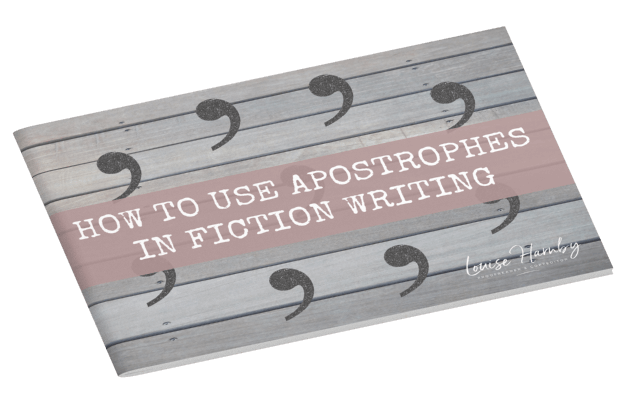
Summing up If you’re looking for ways to make your business life run more smoothly in the next 12 months, perhaps some or all of these 5 tips will help you to save time, increase productivity, and take action. There are some free templates and other resources in the Further Reading section below. Help yourself. Happy New Year! Further reading
Louise Harnby is a line editor, copyeditor and proofreader who specializes in working with crime, mystery, suspense and thriller writers.
She is an Advanced Professional Member of the Chartered Institute of Editing and Proofreading (CIEP), a member of ACES, a Partner Member of The Alliance of Independent Authors (ALLi), and co-hosts The Editing Podcast. Visit her business website at Louise Harnby | Fiction Editor & Proofreader, say hello on Twitter at @LouiseHarnby, connect via Facebook and LinkedIn, and check out her books and courses.
This free booklet offers one example of how an editor or proofreader might approach testing which pricing model works best for their editing and proofreading business.
I discuss how and why I collect data, and the macro and micro insights I've gained that have helped me to grow my editorial income stream.
Hope you find it useful! Visit the Money Matters page in my resource library to download this free booklet. More resources
Louise Harnby is a line editor, copyeditor and proofreader who specializes in working with crime, mystery, suspense and thriller writers.
She is an Advanced Professional Member of the Chartered Institute of Editing and Proofreading (CIEP), a member of ACES, a Partner Member of The Alliance of Independent Authors (ALLi), and co-hosts The Editing Podcast. FIND OUT MORE > Get in touch: Louise Harnby | Fiction Editor & Proofreader > Connect: Twitter at @LouiseHarnby, Facebook and LinkedIn > Learn: Books and courses > Discover: Resources for authors and editors
Apostrophes confound some authors. Not knowing how to use them doesn’t mean you’re a bad writer, but getting them wrong can distract a reader and alter the meaning of what you want to say. This guide shows you how to get it right.
What does an apostrophe look like?
The apostrophe is the same mark as a closing single quotation mark: ’ (unicode 2019). This is worth remembering when you use them in your fiction to indicate the omission of letters at the beginning of a word. More on that further down. What do apostrophes do? Apostrophes have two main jobs: 1. To indicate possession 2. To indicate omission And sometimes a third (though this is rarer and only applies to some expressions): 3. To indicate a plural 1. Indicating possession The English language doesn’t have one set of rules that apply universally. However, when it comes to possessive apostrophes, the following will usually apply: Add an apostrophe after the thing that is doing the possessing.
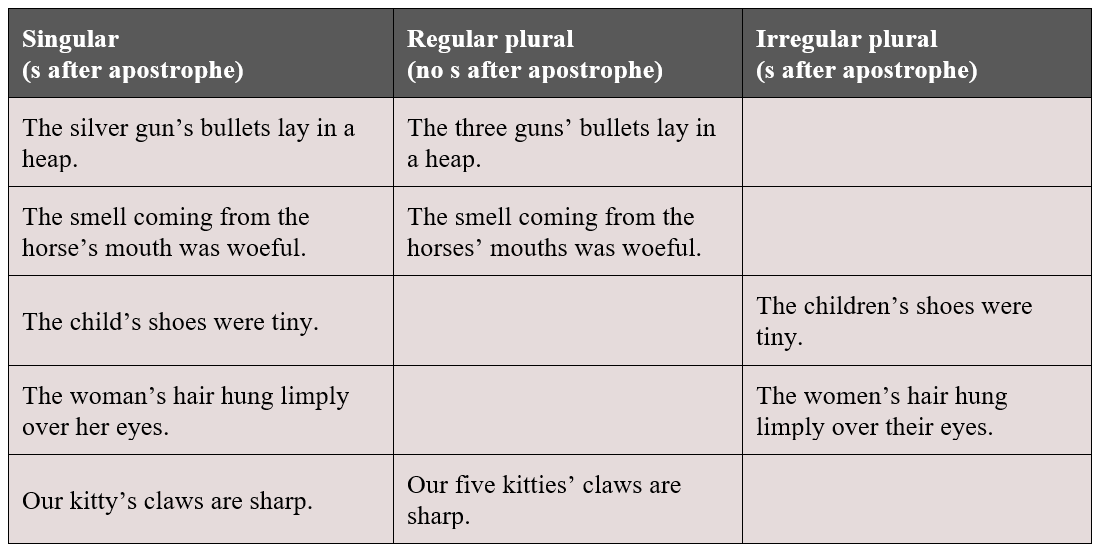
Possessive apostrophes and names
Names can be tricky. The most common problem I see is authors struggling to place the apostrophe correctly when family names are being used in the possessive case, even more so when the name ends with an s. Here are some examples of standard usage to show you how it’s done: 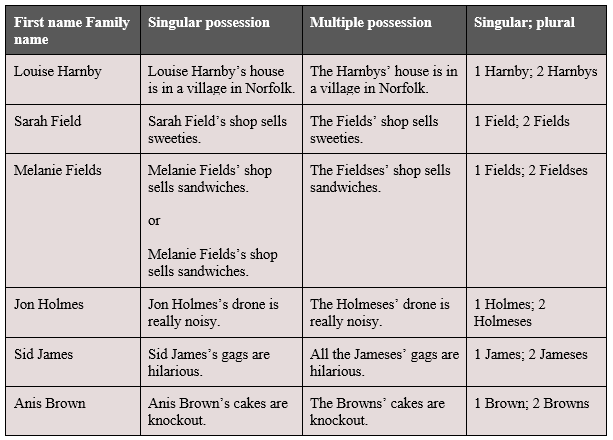
Note that in the Melanie Fields singular-possession example, there are two options. Both are correct but some readers will find the second more difficult to pronounce because there are three s's a row.
Hart’s Rules (4.2.1 Possession) has this advice: 'An apostrophe and s are generally used with personal names ending in an s, x, or z sound […] but an apostrophe alone may be used in cases where an additional s would cause difficulty in pronunciation, typically after longer names that are not accented on the last or penultimate syllable.’ If you're unsure whether to apply the final s in a case like this, use common sense. Read it aloud to see if you can wrap your tongue around it, and decide whether the meaning is clear. Then choose the version that works best and go for consistency across your file. Pedantry shouldn't trump prescriptivism in effective writing. 2. Indicating omission Indicating omission when one word is created from two In fiction, we often use contracted forms of two words to create a more natural rhythm in the prose, particularly in dialogue. The apostrophes indicate that letters (and spaces) have been removed. Common examples include: 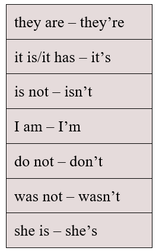
Indicating omission at the beginning, middle and end of single words
We can use an apostrophe to indicate that a letter is missing at the end of a word (dancing – dancin’), the middle of a word (cannot – can’t) and the beginning of a word (horrible – ’orrible). Start-of-word letter omissions are commonly used in fiction writing to indicate informal speech or a speaker’s accent. Make sure you use the correct mark. Microsoft Word automatically inserts an opening single quotation mark (‘) when you type it at the beginning of a word because it assumes you’re using it as a speech indicator. Apostrophes are ALWAYS the closing single quotation mark (’) so do double check if you’re indicating omission at the start of a word. 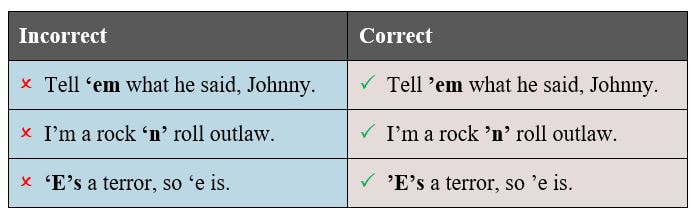
Indicating omission in numbers and dates
Plural numbers don’t usually require an apostrophe because there’s no ambiguity. In fiction writing, it’s common to spell out numbers for one hundred and below, but even when numerals are used, no apostrophe is needed for plurals. 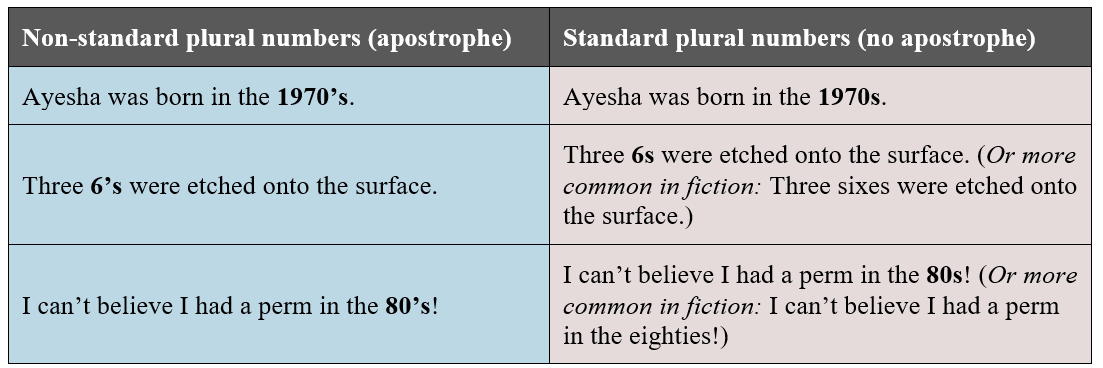
Omission-indicating apostrophes at the beginning of dates are acceptable according to some style manuals. In the example below, the 1970s is abbreviated. It’s conventional in UK writing to follow the NHR example below.
In fiction, however, you can avoid the issue by spelling out the dates. This is universally acceptable, and my preference when writing and editing fiction. 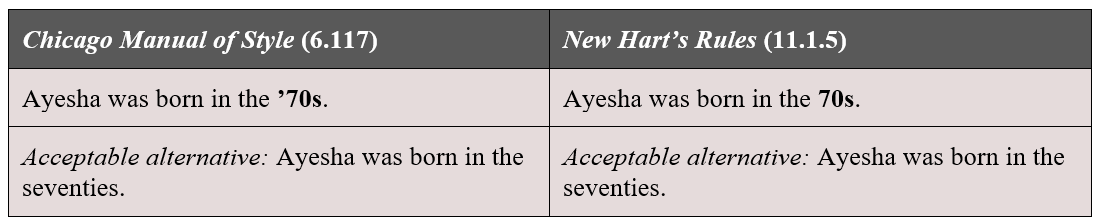
3. Indicating a plural with an apostrophe
When indicating the plural of lower-case letters – for example, if you want to refer to two instances of the letter a – it’s essential to use an apostrophe because the addition of only an s will lead to confusion. In the non-standard examples below, you can see how the plurals (in bold) form complete words, resulting in ambiguity. 
For that reason, it’s considered standard to use an apostrophe (see The Chicago Manual of Style Online 7.15 and New Hart’s Rules 4.2.2).
When indicating the plural of upper-case letters, the apostrophe would be considered non-standard because there’s no ambiguity. 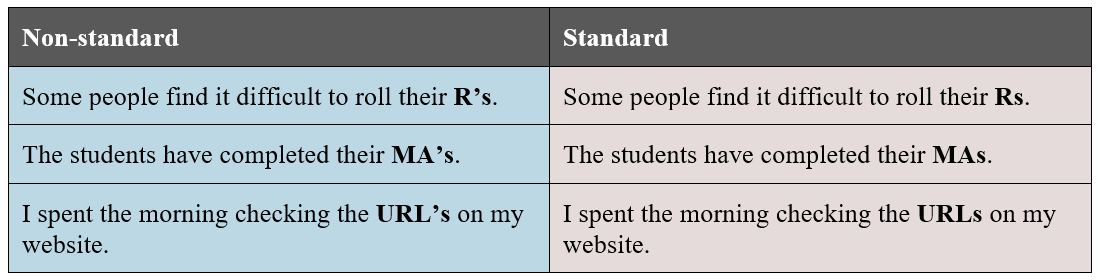
Avoiding erroneous apostrophes and possessive pronouns
Possessive pronouns are the bane of the apostrophe novice’s writing life, especially its! The following possessive pronouns NEVER need an apostrophe: hers, theirs, yours and its.
If you’re unsure whether to insert an apostrophe in its, say it out loud as it is. If it makes sense, you need an apostrophe; if it doesn’t, you don’t! 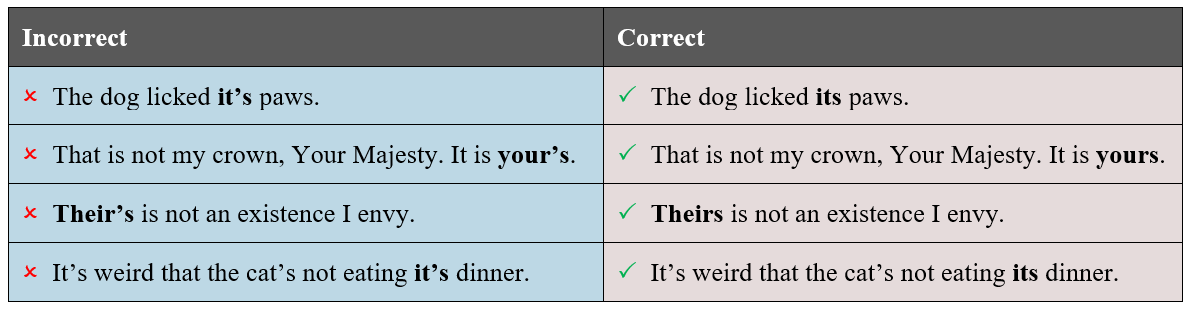
Avoiding erroneous apostrophes in plural forms
The apostrophe novice can fall into the trap of creating plural forms of nouns by adding an apostrophe before the final s. 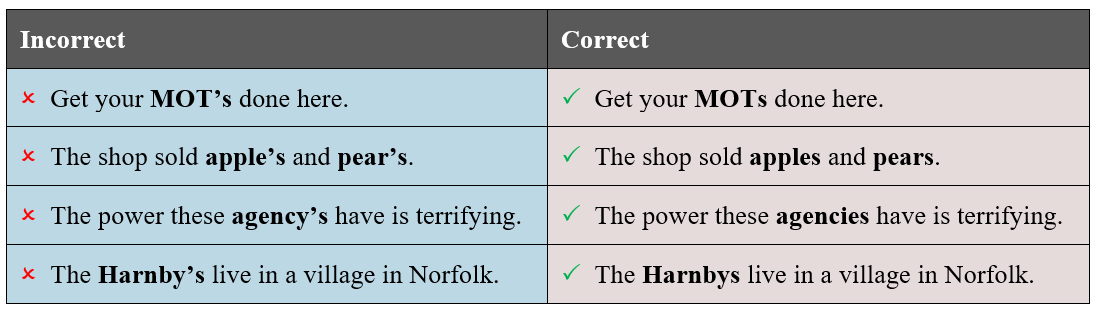
Summary
I hope you’ve found this overview useful. It isn’t exhaustive – there are entire books about apostrophes. Fucking Apostrophes is one of my favourites. However, when it comes to fiction writing, it’s unlikely that you’ll need to worry about more than the basics covered here. If you’re stuck on where to stick your apostrophe, feel free to ask me for guidance in the comments.
Further reading
Want to revisit this information quickly? Visit the Books and Videos page in my resource library to download this free booklet. 
Louise Harnby is a line editor, copyeditor and proofreader who specializes in working with crime, mystery, suspense and thriller writers.
She is an Advanced Professional Member of the Chartered Institute of Editing and Proofreading (CIEP), a member of ACES, a Partner Member of The Alliance of Independent Authors (ALLi), and co-hosts The Editing Podcast. FIND OUT MORE > Get in touch: Louise Harnby | Fiction Editor & Proofreader > Connect: Twitter at @LouiseHarnby, Facebook and LinkedIn > Learn: Books and courses > Discover: Resources for authors and editors
In this article, I offer 12 tips on how to make your book file editor-ready.
Interior book design is something that should be carried out after your book’s been edited, not before.
If you’re creating a printed book, post-design page proofs are perfect for the proofreader because they can check not only your spelling, punctuation and grammar but also the layout. Page proofs are either hard-copy or PDF versions of the book that are laid out exactly as they will appear in the final printed version. You and your proofreader will be looking at what the reader would see if they were to walk into a bookshop, pull the title off the shelf and browse through the pages … almost. The proofreader’s job is to ensure that any final errors and layout problems have been attended to before the book is printed. For a comprehensive overview of what needs to be attended to when proofreading designed page proofs, read this (available free when you sign up to The Editorial Letter): Proofreading checklist: How to check page proofs like a professional. 
With copyediting (and proofreading raw-text files for digital books), it’s a different story ...
Working with raw-text files If you are asking a professional editor to work on the raw text of your book, follow these 12 recommendations to ensure that the file is editor-friendly. The good news is this: it means less work for you, not more, because you’re not having to design anything … not yet, anyway. 1. File format Most professional fiction editors work in Microsoft Word. That’s because, despite the odd glitch, it’s still the best word-processing software on the planet. It has a range of excellent onboard tools that help your editor style the various elements of your text consistently, and quickly locate potential problems that might need fixing. Word is compatible with a host of macros that complement the editor’s brain and eye. That means they can add an extra level of quality-control to the edit efficiently. Even if you’ve written your book in a different program – for example, Scrivener, Google Docs or Apple Pages – place the text in a Word file before you send it to your editor. You’ll get a better-quality book edit, I promise. 2. Number of files Unless you’ve agreed with your book editor to work serially – i.e. on a chapter-by-chapter basis – create a single master file that contains the full text of your novel. If you send them 75 separate chapters, all they’ll do is combine them into one file … after they’ve finished weeping with frustration. Editors want to ensure that your book is consistent – that Kathyrn doesn’t become Katherine, Catherine or Cathryn. There are Word plug-ins that can help them identify problems like this efficiently but they’re only effective if the editor is working with a single file. The same applies to ensuring that the various elements of your text are formatted consistently. For example, it’s conventional for the first paragraph in a chapter or section to be full-out (not indented). Your editor can use Word’s styles palette to define the appearance of a first paragraph. Once the style has been set, it’s a case of applying it to every relevant paragraph in the file. If they don’t have a master file to work with, they’ll have to create a new style for each one of your 75 chapters or import that style for the same. Fiction editors love master files, and they will love you if that’s what you provide. 3. Fonts You might have decided to use an unconventional font for your book interior. You’re perfectly entitled to use any font you choose ... just spare a thought for your editor’s eyes. When it comes to the editing stage, stick to something like Times New Roman, size 14. It’s a serif font, which means it’s easy on the eye. The less your editor struggles to read the text, the better the quality of their work. 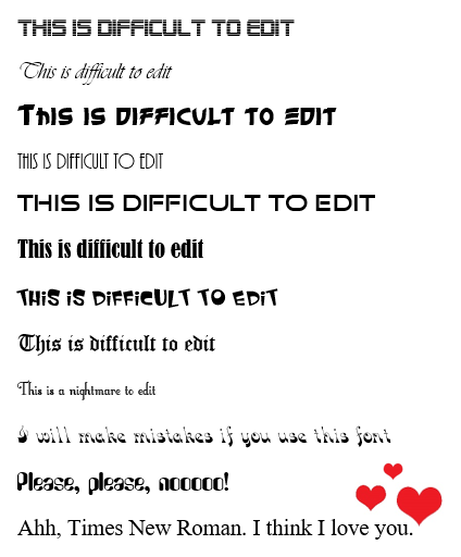
4. Colours
I recommend you use black text on a white page. Again, it’s about readability. The white text on the coloured blocks below certainly stands out, and the contrast is visually appealing, but for editing purposes it’s a challenge. 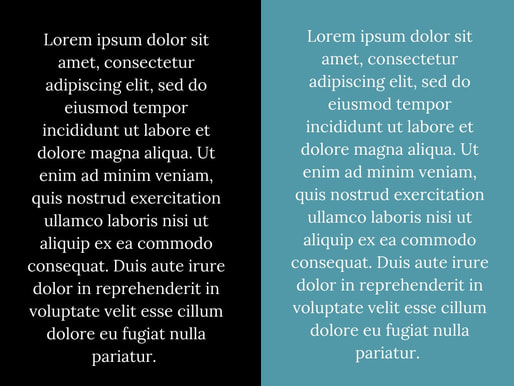
A couple of years ago, I was asked to copyedit a fabulous book for an indie author. The pages were black, the text pink. The first thing I asked him – no, begged him – was for permission to change the file’s appearance to something more conventional.
He agreed to save the quirky colourway for the design stage and I was immensely grateful. So was he. I’d have had to increase my price because I would have edited more slowly. 5. Paragraphs Open any novel on your bookshelf and it’s likely you’ll see a text layout something like this: 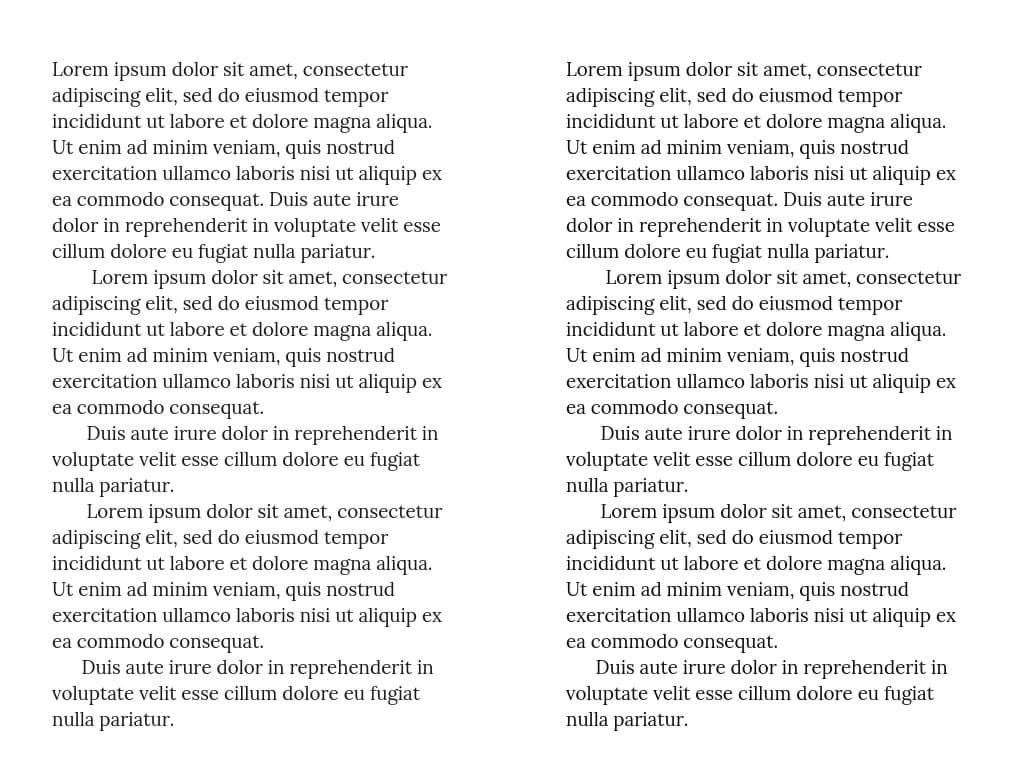
Those indented paragraphs are not made using the tab key. Instead, use Word’s ribbon to create proper indents.

To find out how to create a body-text style with proper indents, watch this video tutorial: Self-editing your fiction in Word: How to use styles.
6. Spacing At line and copyediting stage, don’t worry about how many pages your text covers. Instead, give your editor a file with the lines spaced so that the text is easy to read. Setting the line spacing at 1.25 or 1.5 works well for a font size of 12 or 14. The line spacing function can be located by right-clicking on text and selecting PARAGRAPH. A window will open. Make sure you’re in the INDENTS AND SPACING tab. Then amend the LINE SPACING field. 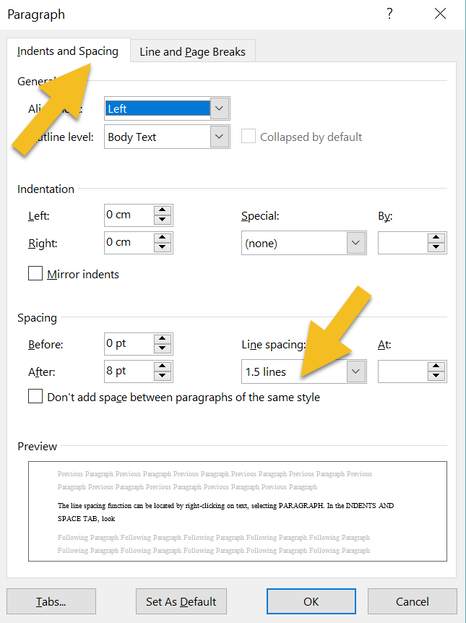
7. Chapter headings
Your editor will adore you if you assign your chapter headings with one of Word’s heading styles: 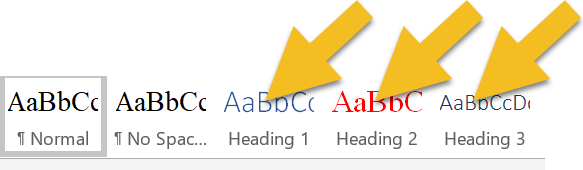
You can even modify the style so that it automatically starts on a fresh page.
Right-click on the heading style, select MODIFY, then FORMAT, then PARAGRAPH. A window will open. Make sure you’re in the LINE AND PAGE BREAKS tab. Check the PAGE BREAK BEFORE box. 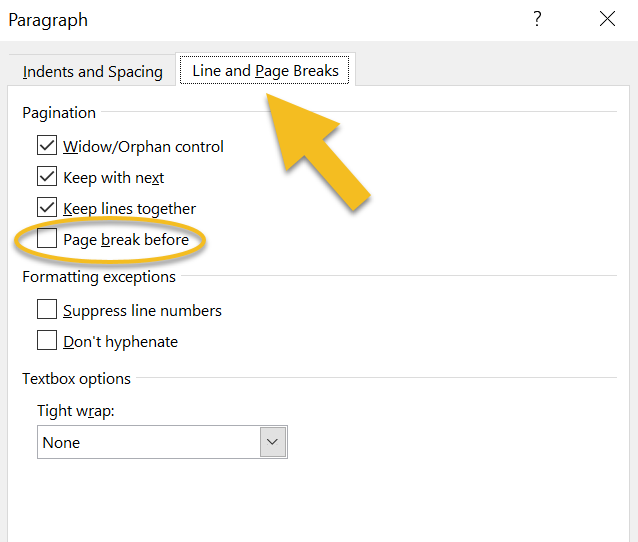
Why is this useful?
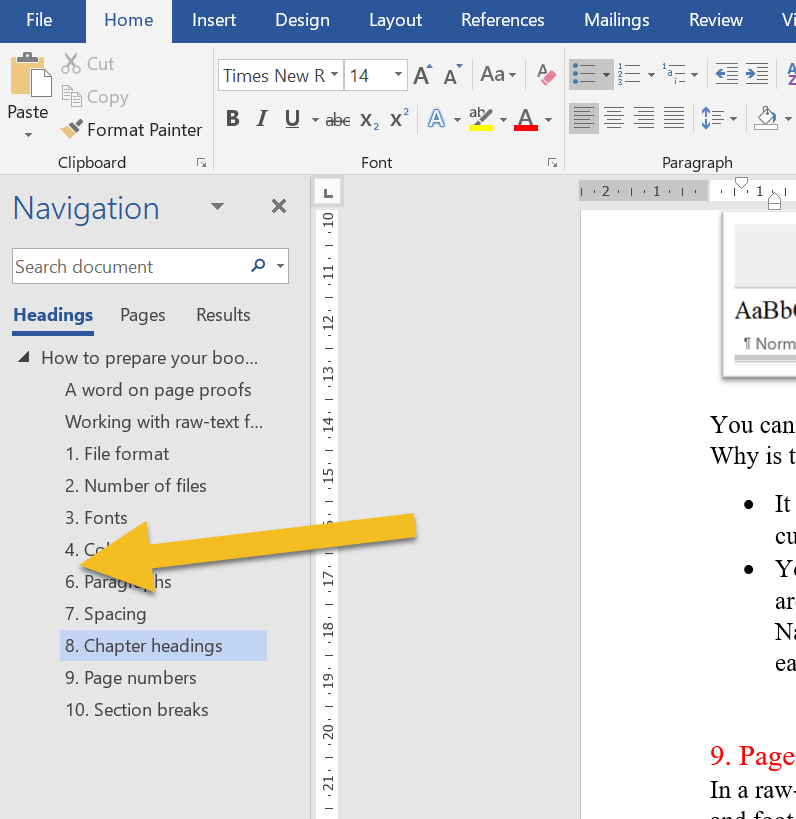
8. Page numbers
In a raw-text work of fiction, there’s no need for page numbers or other headers and footers. Word records the page number in the bottom-left-hand corner of the screen of a PC, and that’s what an editor will refer to if they need to direct your attention to a specific page. 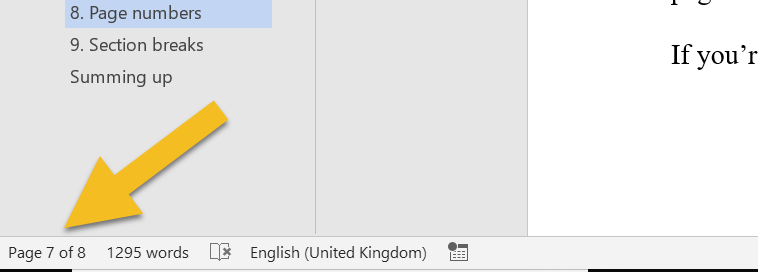
If you plan to upload a later version of your file for ebook creation, your page numbers will need to be removed anyway.
If you’re printing, save the page numbering for design stage. 9. Section breaks I recommend introducing three asterisks (***) to indicate a section break. You can change them at design stage of course, but they’re handy at editing stage because your editor can see that you intend for there to be a section break. Why not just have a line space? Because sometimes a writer will accidentally hit the return button twice. Your editor will have to spend time working out whether the break is intended rather than focusing on the flow of your text and any errors that need correcting. 10. Pictures/images If your editor needs to check copy against images and their captions, consider placing these in a separate file. Images, especially high-resolution ones, will increase the size of your book file massively, and slow down refreshing when the editor saves. And your editor will save once every few seconds. Sounds bonkers, doesn't it? But the editor who doesn't save regularly is the editor who finds they've lost a precious half-hour's worth of editing because there was a power cut, or a hurricane, or the oven exploded, or whatever. And when they come to email your edited file full of hi-res images, it will be so huge that they'll have to use an external cloud-based transfer service. The file will take an hour to load (unless they have rubbish broadband speed, in which case it will take two or three hours). They'll do the transfer in the evening so that it doesn't slow them down while they're working, meaning their teenage kid will start moaning and giving them that look because Netflix is buffering or Minecraft won't load, or something equally devastating. Save us, I beg you. 
On top of all that, amendments, deletions, and additions to the text will cause your carefully placed images to shift into spaces you didn't intend. Better to leave image placement to interior-design stage. It'll save you and your editor time and tears.
11. Manual tables of contents If you've created a table of contents in a Word file prior to copyediting, there's a good chance that a chunk of your page numbers and some of the chapter titles will be wrong by the time your editor has finished. Of course, you can pay them to fix these too. But that could add an extra hour's work onto your bill. Worse, you'll be wasting your money because when the book's interior is designed, everything will change again. I know this because when I proofread for publishers (and that means I'm working on designed page proofs that have been edited multiple times and designed by a professional interior formatter) the table of contents is always messed up. Sort out your table of contents before you do your final design, not at copyediting stage. It'll save you money, I promise. 12. Manual index I'm adding this one in for non-fiction writers, just in case you're reading. If the page numbers against a table of contents get messed up during copyediting, the damage to an index is nothing short of catastrophic. It's not just the page numbers, but the indexed entries too. Spellings might change, so might compound hyphenation. Some key terms will have been removed or changed. Others will have been added. Indexing should come after proofreading, ideally, but certainly not at copyediting stage. Summing up These are just suggestions, not book law, editing law, any kind of law. However, your editor will love you if you make life easier for them, not because they’re lazy but because they want to focus on making your narrative and dialogue sing rather than formatting text so that it’s readable. There’s absolutely a time and a place for great interior design, but pre-editing stage is not it. Save yourself the bother and keep it simple. For more raw-text tidy-up tips, grab this free booklet: Formatting in Word: Find and Replace. 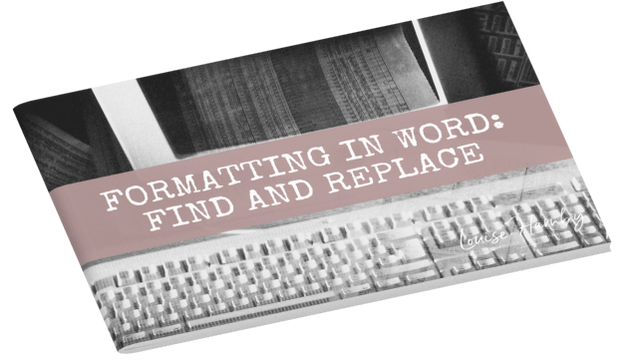
Fancy watching a video instead? Here’s where to find the free tutorial.
Louise Harnby is a line editor, copyeditor and proofreader who specializes in working with crime, mystery, suspense and thriller writers.
She is an Advanced Professional Member of the Chartered Institute of Editing and Proofreading (CIEP), a member of ACES, a Partner Member of The Alliance of Independent Authors (ALLi), and co-hosts The Editing Podcast. FIND OUT MORE > Get in touch: Louise Harnby | Fiction Editor & Proofreader > Connect: Twitter at @LouiseHarnby, Facebook and LinkedIn > Learn: Books and courses > Discover: Resources for authors and editors
If you're a first-time writer, working out which editorial services you need help with and what you can do yourself can be tricky. Is proofreading enough or do you need additional assistance? A key question is: How does your reader dance?
Here's a free PDF booklet that covers the key issues. In it, you'll find guidance on:
Visit the Books and Videos page in my resource library to download this free booklet. 
Louise Harnby is a line editor, copyeditor and proofreader who specializes in working with crime, mystery, suspense and thriller writers.
She is an Advanced Professional Member of the Chartered Institute of Editing and Proofreading (CIEP), a member of ACES, a Partner Member of The Alliance of Independent Authors (ALLi), and co-hosts The Editing Podcast. FIND OUT MORE > Get in touch: Louise Harnby | Fiction Editor & Proofreader > Connect: Twitter at @LouiseHarnby, Facebook and LinkedIn > Learn: Books and courses > Discover: Resources for authors and editors
Good proofreading practice means acknowledging that changing one word, or moving one line, can have unintended and damaging consequences throughout the rest of the book if we aren’t careful.
If we want to proofread for publishers, packagers and project-management agencies, or if we're checking self-publishers' print-on-demand books, we need to be comfortable with working on page proofs.
What are page proofs? The proofreader will usually be asked to work on page proofs. What are they?
'Page proofs are so-called because they are laid out as exactly as they will appear in the final printed book. If all has gone well, what the proofreader is looking at will be almost what the reader sees if they were to walk into a bookshop, pull this title off the shelf and browse through the pages.
The layout process has been taken care of by a professional typesetter who designs the text in a way that is pleasing to the eye and in accordance with a publisher’s brief.' (Not all proofreading is the same: Part I – Working with page proofs) In this case, the proofreader does not amend the text directly. They annotate the page proofs. You might be required to work on both hard-copy page and PDF page proofs – it will depend on the client’s preference. You'll be looking for any final spelling, punctuation, grammatical, and consistency errors that remain in the text. However, you'll also expected to check the appearance of the text. Checks will include the following:
This isn't a comprehensive list but it gives you an idea of how this type of proofreading goes beyond just checking the text for typos. If your client hasn’t supplied you with a proofreading checklist, you can access this free one when you sign up for The Editorial Letter. 
CLICK IMAGE TO ACCESS
What's important here is that every amendment you suggest might have an impact somewhere else. That doesn’t mean you shouldn’t make the amendment; it means, rather, that you need to be mindful of the consequences of your actions – the knock-on effects.
What are knock-on effects? Professional proofreaders often refer to the indirect consequences of their mark-up as knock-on effects. A useful way of thinking about this is in terms of dominoes because it provides us with the perfect description of what’s at stake. Imagine you've lined up four dominos: A, B, C, and D. You push over A and it pushes over B. B then knocks over C, which in turn causes D to fall. Domino D’s topple was caused indirectly by Domino A, even though A didn’t touch D. This process can occur on page proofs and can have serious consequences. The changes we make can, if we’re not careful, impact on the text flow, the pagination, the contents list, and the index. 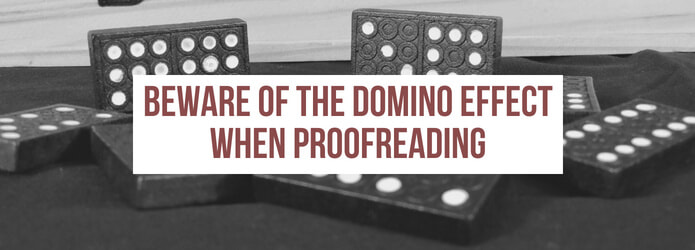
An example
Here’s an example to illustrate the point. Imagine the publisher’s brief tasks the proofreader with attending to orphans and widows (those stranded single lines at the bottom or top of a page). Solutions that involve instructing a typesetter to shuffle a line backward to a previous page, or forward to the next page, in order to avoid the widow/orphan might cause one, or all, of the following problems:
In all three cases, the proofreader has prevented one problem but caused others. Consequently, good practice involves more than blindly placing mark-up instruction on any given page. Thought needs to be given to how the problem can be tackled and the impact managed so that there is no knock-on effect. Spotting an orphaned or widowed line is not enough. We might also have to consider the following:
Summing up If you’re considering training as a proofreader and want to be fit for the purpose of marking up page proofs, check that your course includes a component about knock-on effects. Even when we are supplied with detailed briefs about an ideal layout, the publisher client expects us to be mindful of the consequences of our amendments. The proofreader’s job is to find solutions to problems in ways that don’t cause unintended damage.
Louise Harnby is a line editor, copyeditor and proofreader who specializes in working with crime, mystery, suspense and thriller writers.
She is an Advanced Professional Member of the Chartered Institute of Editing and Proofreading (CIEP), a member of ACES, a Partner Member of The Alliance of Independent Authors (ALLi), and co-hosts The Editing Podcast. Visit her business website at Louise Harnby | Fiction Editor & Proofreader, say hello on Twitter at @LouiseHarnby, connect via Facebook and LinkedIn, and check out her books and courses.
Here are 10 tips to help you prepare the way for editing and proofreading fiction for independent authors and self-publishers.
If your editorial business is relatively new and you’re keen to specialize in fiction editing, there are some core issues that are worth considering. Some of these certainly apply to other specialisms, but fiction does bring its own joys and challenges.
1. Untangle the terminologyYou'll need to be sensitive to the fact that your clients may not be familiar with conventional editorial workflows or the terms we use to describe them! Clarify what the client expects, especially when using terms like ‘proofreading’ and 'editing'.
2. Discuss the revision extentClarify the extent of revision required before you agree a price.
3. Manage expectationsFind out how many stages of professional editing the file has already been through.
4. Put the client first – it’s all about the authorWhat’s required according to the editorial pro and what’s desired by the client (owing to budget or some other factor) could well be two very different things.
5. Be a champion of solutionsThe authors we’re working with are at different stages of writing-craft development. Some are complete beginners, some are emerging, others are developing and yet others are seasoned artists. If they’re in discussion with us, it’s because they think we can help.
6. Be prepared to walk awaySometimes the author and the editor are simply not a good fit for each other. In the case of fiction, this can be because the editor can't emotionally connect with the story.
7. Decide whether fiction's a good fit for youThere are challenges and benefits to fiction editing and proofreading.
8. Do a short sample edit before you commitUnless you’ve previously worked with the author, work on a short sample so that you know what you’re letting yourself in for.
9. Query like a superhero!All querying requires diplomacy, but fiction needs a particularly gentle touch.
10. Keep your clients' mistakes to yourselfSome of our self-publishing clients are pulled a thousand-and-one ways every day. And, yet, they’ve found the time and energy to write a book. We must salute them. Some are right at the beginning of the journey. There’s still a lot to learn and they’re on a budget; they’ve not taken their book through all the levels of professional editing that they might have liked to if things had been different. Some haven't attended writer workshops and taken courses, and they probably never will – there’s barely enough time in the day to deal with living a normal life, never mind writing classes. They’re doing the best they can. With that in mind, respect the journey.
We must always, always respect the writer and their writing, and acknowledge the privilege of having been selected to edit for them. Those are my 10 tips for working with indie fiction writers! I hope you find them useful as you begin your own fiction-editing journey!
Louise Harnby is a line editor, copyeditor and proofreader who specializes in working with crime, mystery, suspense and thriller writers.
She is an Advanced Professional Member of the Chartered Institute of Editing and Proofreading (CIEP), a member of ACES, a Partner Member of The Alliance of Independent Authors (ALLi), and co-hosts The Editing Podcast. Visit her business website at Louise Harnby | Fiction Editor & Proofreader, say hello on Twitter at @LouiseHarnby, connect via Facebook and LinkedIn, and check out her books and courses.
This article shows you what it might cost to get your novel line edited, copyedited or proofread. However, the short answer is: it depends ...
This post headlined in Joel Friedlander's Carnival of the Indies #94
I’ll look at each of these points in turn, then offer you some ideas of what you can do to reduce the financial hit.
First of all though, a quick word on whether you should bother and, if you do, what type of service you should invest in. Do you have to work with a professional editor? Not at all – it’s your choice. That’s one of the biggest benefits of self-publishing. You get to stay in control and decide where to invest your book budget. However, I absolutely recommend that your book is edited ... by you at the very least, but ideally by a fresh set of eyes, and even more ideally by a set of eyes belonging to someone who knows what to look out for. And the reason for that recommendation is because 99.99% of the time, editing will make a book better. We can all dream about first-draft perfection, but it’s pie in the sky for most, even those who edit for a living. I’m a professional line editor, copyeditor and proofreader, and today I wrote a guest blog post for a writer. I wrote, and then I edited ... first for content, then for flow, then for errors. I found problems with each pass. That’s not because I can’t write. It’s not because I can’t string a sentence together. It’s not because I didn’t edit properly in the first round. The reason I found problems is because writing is one process – editing is another:
And the different types of editing attend to different kinds of problems and have different outcomes. Trying to do everything at once is like trying to mix a cake, bake it, ice it, eat it, and sweep up the crumbs all at the same time. Breaking down the writing and editing processes into stages is a lot less messy, and the quality of outcomes is much higher. Still, that has a cost to it, and it’s a cost that the self-publisher will have to bear because there’s no big-name press to bear the burden for them. 
Cost of editing: the individual editor
The independent editing market is global and diverse. Editors specialize in carrying out different types of editing. Some specialize by subject or genre. They have different business models and varied costs of living. And that means that despite what you might read in this or that survey, there is no single, universal rate. Neither is there a universal way of offering that rate:
My preference is to charge on a per-word basis, subject to seeing a sample of the novel. Because economies of scale come into play with longer projects, my per-word prices decrease as the project length increases. For example, in 2020, I charge 7.5 pence per word for a 1,000-word sample edit, but the fee is 20% cheaper if I'm line editing a 5,000-word story and 50–60% cheaper if I'm dealing with an 80,000-word novel. And so it depends on the parameters of the project. Some editors charge more than me, some less, and some the same. My colleagues live all over the world, and fluctuations in the currency-exchange markets mean that comparisons will yield different results from day to day. 
Cost of editing: industry surveys and reports
Some professional organizations suggest or report minimum hourly rates for the various levels of editing. They’re ballparks, nothing more, for reasons outlined below the table (fees correct as of July 2019).
ARE THESE RATES REALISTIC?
Do these figures bear any relation to what individual editors charge? Sometimes but not always. Most organizations recognize that these reported prices don’t always reflect market conditions, and they’re right to do so. Many editors and proofreaders, myself included, aim for rates at least 30% higher. Why? Because that’s what it takes for our businesses to be profitable. Editing and proofreading aren’t activities we do in our spare time. They're not side hustles. They’re careers that enable us to pay the bills. If we can’t meet our living costs, we become insolvent, just like any other business owner. The problem with these ballparks is that they don’t reflect the speed at which an individual works, the complexity of each job, the time frame requested, or the editor’s circumstances. An additional problem is that how these organizations define ‘proofreading’, ‘copyediting’ etc. might not reflect an author’s understanding of what the service involves, or what an editor has elected to include. And then there’s the age-old issue of currency-exchange rates. What might seem a high rate to you one day could turn into something quite different the next, and not because the editor’s or the author’s life has changed, but because of Trump, or the Bank of England, or a hung parliament here, or a banking crisis there. Bear in mind that independent editors are professional business owners, and just like any other business owner they are responsible for tax, insurance, sick pay, holiday pay, maternity/paternity entitlements, training and continued professional development, equipment, accounting, promotion, travelling expenses, pension provision, and other business overheads. 
Cost of editing: turnaround time
The table below gives you a rough idea of the speed at which an editor can work. Again, we’re dealing with ballpark ranges because the true speed will depend on the complexity of the project and how many hours a day the editor works.
Experienced editors have years’ worth of data that enables them to review a sample of a novel and estimate how long a project will take based on the level of editing requested.
The figures in the table above represent a working day of around 5 hours of actual editing. Additional time will be spent on business administration, marketing and training. Here’s how costs might begin to creep up. Imagine you ask your editor to copyedit your 80K-word novel. The editor estimates the job will take 50 hours, or two weeks. You need it in one. If you want to work with that editor, they’re going to have to work 10 hours a day, not 5. That means they have to pull 5 evenings on the trot in addition to their standard working day. That evening work is when they spend time with their families, recharge their batteries, catch up with friends, support their dependents, carry out the weekly food shop, help their kids with the homework ... normal stuff that lots of people do. If you want them to work during that time, it’s probably going to cost you more. For example, I charge triple my standard rate because my personal time is valuable to me – and to my child, who will need bribing! 
Cost of editing: the complexity of the project
The more the editor has to do, the longer the job will take and the higher the cost. Some authors might not be aware of the different levels of editing and what each comprises. And editors don’t help – we define our services variously too! For that reason, sometimes it makes sense to move away from the tangled terminology and focus on what each project needs to move it forward. An author might ask for a ‘proofread’ but the editor’s evaluation of the sample could indicate that a deeper level of intervention will be needed ... something more than a prepublication tidy-up. I’ve copyedited novels whose authors had nailed narrative point of view at developmental editing stage, so I didn’t have to fix the problem. I’ve also copyedited novels in which POV had become confused. The sample-chapter evaluation highlighted the problem, and I had to adjust my fee to account for the additional complexity. 
How to reduce your editing costs
So, there we have it – 1,300 words that tell you not what editing and proofreading will cost, but what they might cost, depending on this, that, and everything else! Here are some ideas for how to reduce your costs. GENERAL MONEY-SAVING TIPS
CLICK IMAGE TO DOWNLOAD
SAVING MONEY ON DEVELOPMENTAL EDITING Hone your story craft by reading books, taking writing courses, and joining writing groups through which you’ll be able to access fellow scribes! You can critique each other’s work and help each other with self-editing. I recommend these books:
Rather than commissioning a full developmental edit, you could pay for a critique or manuscript evaluation, or a mini edit. Those will help you to identify what works and what doesn’t so that you can make the adjustments yourself. SAVING MONEY ON LINE EDITING Hone your sentence-level mastery, again through books, courses and groups. Some editors offer mini line edits for this stage of editing too. Here, the editor offers a line-by-line edit on several chapters and creates a report on the sentence-level problems with the text with recommendations for fixing them. The author can then refer to the mini line edit and mimic the sentence smoothing and tightening. This kind of service is particularly useful for beginner authors who already know they’re prone to overwriting. And I have a book you might find useful:
SAVING MONEY ON COPYEDITING Learn how to use Word’s amazing onboard functionality, and macros and add-ins that flag up potential errors and inconsistencies. Here are some tools you can use:
SAVING MONEY ON PROOFREADING If you’re working on designed page proofs, there are a series of checks you can take your novel through.
That’s it! I hope this article has given you a sense of what you might have to spend, and how you might be able to save during the editing process.
Louise Harnby is a line editor, copyeditor and proofreader who specializes in working with crime, mystery, suspense and thriller writers.
She is an Advanced Professional Member of the Chartered Institute of Editing and Proofreading (CIEP), a member of ACES, a Partner Member of The Alliance of Independent Authors (ALLi), and co-hosts The Editing Podcast. Visit her business website at Louise Harnby | Fiction Editor & Proofreader, say hello on Twitter at @LouiseHarnby, connect via Facebook and LinkedIn, and check out her books and courses.
If you're suffering from yet another dry spell, this webinar will help you get editing and proofreading work in the next few days and weeks.
I'll show you 10 steps you can take to move out of famine mode quickly.
Forget theory. This is all about doing ... step-by-step guidance on short-term fixes that will give you peace of mind in the now, and head space to dig deeper in the future.
Click on the button below to find out more.
Louise Harnby is a line editor, copyeditor and proofreader who specializes in working with crime, mystery, suspense and thriller writers.
She is an Advanced Professional Member of the Chartered Institute of Editing and Proofreading (CIEP), a member of ACES, a Partner Member of The Alliance of Independent Authors (ALLi), and co-hosts The Editing Podcast.
PerfectIt is the premier consistency-checking software for many professional editors and proofreaders around the world. Developer Daniel Heuman and I sat down for a chat about what's new!
So Daniel was in New York, and I was in a tiny hamlet in Norfolk called Panxworth. Despite the 6,000 miles between us, the construction works going on outside his apartment, and the internet-connection problems in my somewhat rural neck of the woods, we managed to produce a video of our chinwag!
For those of you who want to jump to specific parts of the conversation, here are the key themes and associated time stamps: ▶️ Louise introduces Daniel Heuman, developer of PerfectIt: 00:00:00 ▶️ What PerfectIt does and why it’s useful: 00:00:24 ▶️ PerfectIt Cloud – the new solution for Mac users: 00:04:08 ▶️ Windows users: Should we buy PerfectIt Cloud?: 00:06:12 ▶️ The subscription model and a new lower price: 00:09:27 ▶️ The benefits of up-to-date editing kit: Stability and support: 00:12:27 ▶️ PerfectIt and Office 2016: 00:14:54 ▶️ PerfectIt 4: Online, in the cloud, or both? 00:18:35 ▶️ Features of PerfectIt 4: 00:20:24 ▶️ Sign-off: 00:25:44 And below is the conversation in full. Click on the Play button to begin listening. I've included subtitles in case you need to turn the sound off or can't understand our British accents! There's a full transcript below. I've edited this for readability but essentially it's the words as they were spoken on the day. THE VIDEO THE FULL TRANSCRIPT Louise introduces Daniel Heuman LH: My name is Louise Harnby and I’m a fiction editor, and today I’m going to be talking to the founder of Intelligent Editing and the developer of a piece of software beloved by many editors all over the world. And that’s PerfectIt. Before Daniel and I start chatting about all the PerfectIt news, Daniel’s going to tell us a little bit about what PerfectIt does, because some of you might not know. So over to you Daniel! What PerfectIt does and why it’s useful DH: Thank you! It’s lovely to speak to you! This is very exciting. I don’t know that they’ve ever done a video interview like this before so thank you! OK. PerfectIt – for the people who have not come across it before (which is probably exactly who won’t be watching this, but hopefully they are!) LH: You never know! DH: You never know! Exactly! So PerfectIt is mostly consistency-checking software, and the key place where it comes in is that when you’re editing work it’s almost always under, you know, time pressure, and with a pressure to produce perfect work. It’s ultimately dealing with the fact that everything is going to be on a budget. So given a limited time, what is the best document you can produce? And PerfectIt really fits in there. It saves time; it helps you edit faster. And the way I was trying to explain it the other day was at the ACES conference. I have new way of explaining it ... I thought a little bit about what gets people into editing. And I think that without delving into the deep psychology of what makes anyone an editor, I think one of the things that does not drive people is the difference between tiny consistency mistakes. So, yes, it’s fun sometimes when you spot ‘e-mail’ with a hyphen in one place and not in another but mostly that’s not what’s driving people. People get into editing because you care about words, you like reading, you care about communication, you want to explain stories, you want to help people connect better with readers. And these little tiny mistakes that take so much time to spot are not the reason. They are a distraction. They’re significant because they jump out at readers but they’re not the reason why we get into this. And they’re certainly not the reason why one should be spending a lot of time on a document. LH: And you’re so right because they take so long to deal with. I’ve had manuscripts before where, actually, particularly if an author’s got a budget, people like me are spending perhaps hours and hours and hours when we’re using just our eyes, dealing with these tiny inconsistencies, which as you say are red flags. And, yet, actually what we want to do is immerse ourselves in the narrative in front of us and to make it better. And the more time we can spend focusing on the flow of the words ... because every time you come across a hyphen that’s inconsistent, or inconsistent capitalization, as an editor, you’re dragged out of the flow of the work as well. And so being able to do that, to save time by having a piece of software like PerfectIt to do that for you is just wonderful. And you still get the pleasure of knowing that you’re bringing this consistency to the work. But it is back-breaking doing that manually. I think that’s the thing that a lot of editors feel. It’s just back-breaking work. And I would rather an author paid me to do other things with my time. I want them to feel that I’m going to do those things but I don’t want to have to spend more time than necessary doing it, and that’s where your software comes in. DH: Absolutely, and we put on the homepage something like: you spend the time on what matters most, which is your words and their meaning. LH: Yeah, yeah, that’s exactly it. PerfectIt Cloud – the solution for Mac user LH: So, Daniel, in the past, PerfectIt’s only been available to Windows users. Well, that’s not quite true. I do have Mac-using friends who have been able to use PerfectIt but they have to be running something like Parallels, or I think it’s called VM Fusion Ware or something. Or they’ve had to go buy a cheap Windows laptop. So I suppose that’s the thing that everybody’s talking about. Like, what’s new for Mac users? DH: That is the news! So first off, it’s been touching and amazing, the extent to which people have been going to use PerfectIt. Like you say, they’ve been installing Parallels. People have been buying computers to run this program, which is touching. I know that buying another computer doesn’t cost as much as it used to but, still. But for Mac users who hate Windows and just run it for one program has been phenomenal to see. But yes, no longer! So we are producing PerfectIt Cloud, which is ... you’re going to have to forgive ... in the background you can probably hear the construction noise! I’ll do my best to speak over it. So we’re producing PerfectIt Cloud, which is an Office Store add-in. And the great thing about Office Store add-ins is that they are compatible in any version of Office 2016. So if you are on a Mac, if you’re on a PC, if you’re on an iPad, even in Word Online (which I don’t know that anyone actually uses), no matter which version you’re on, you see the same add-in. So the functionality is exactly the same across. And we’ve been developing this for ... I mean, you know, the amount of times people have heard me saying, ‘A Mac version is coming soon. It’s just a few months. It’s just a few months.’ But, no, as of 26 June we will have PerfectIt Cloud, which brings compatibility to Mac and to iPad for the very first time. So it’s really exciting! Windows users: Should we buy PerfectIt Cloud? LH: So what about Windows users? I have PerfectIt 3. I’ve had all the versions since it first launched. I work on a PC. Should I rush out and get PerfectIt Cloud? DH: In a word, no. So the introduction of PerfectIt Cloud is primarily for Mac and iPad users at this stage. So if you’re using PerfectIt 3, if you’ve got a Windows PC, that’s still going to be the best version that we offer. And it’s going to be strange because PerfectIt Cloud looks so much better! The interface is even easier than it was before. It’s a beautiful product, but underneath there are a few things that PerfectIt 3 can do that we haven’t been able to do for Cloud yet. So the most important one of those is customization of styles. That’s still going to take some time to bring into PerfectIt Cloud. The ability to check footnotes – we’re going to be dependent on Microsoft for them to make some changes before we can bring that in. So if you have PerfectIt 3, if you have a PC, in most cases the thing to do is not to rush out, and not to buy this at least until we produce a new version for the PC, which will be PerfectIt 4. There’s one exception, which is, you know, all those people who ... the ones, the amazing wonderful users that you’ve described who have gone and bought VMware, and Parallels, and even separate computers. A bunch of those users are really frustrated with having to turn them on every time, and going through Windows updates, which take forever. And just to get PerfectIt up and running takes two hours. And it’s saving them a lot of time so they do it, but if you’re one of those people who has both a PC and a Mac, in those cases, yes, you would. Not all the options are included but it’s close enough that you may not want to be uploading and updating your Windows computer each time just to run PerfectIt. LH: Yeah, and I suppose also for people perhaps who are, I don’t know ... I was thinking about the increasing number of editors who are location-independent. And, actually, maybe they don’t always have the latest ... you know, they’re don't want to be worried if their computers break ... and the idea perhaps of just knowing that it doesn’t matter which PC you’re on, or which Mac you’re on, that if you’ve got something, a machine in front of you, you can do your work and you can access the core functionality of PerfectIt wherever you are. And that’s an important thing, I guess. I mean, I’m not location- independent. I am very much dependent! I’m in Norfolk with a rubbish broadband speed and so I’m kind of quite keen to keep things offline and local when I can. But knowing that I’ve got the choice – that will be a big issue for me. The subscription model and a new lower price LH: Can we talk about price now? Because in the past, once every two or three years, you bring out a new version, and I’ve paid you, I don’t know, $90? I can’t remember the price off the top of my head. So that’s the way it’s worked. But you’re doing things slightly differently now, aren’t you? DH: Yes. So we are switching to a subscription ... sort of a subscription. And I know the minute I use that word people are turning off this video, don’t want to know anything more. because everyone is sick to death of subscriptions with, you know, Netflix and Amazon, and, oh my God, you can get a subscription for your vegetable delivery now, which is bonkers! But I think what we’re doing is really different to that. We switched to a once-a-year payment. At this point at least, there’s no handover-your-credit- card or anything like that. You pay each year if you want to continue using it. And switching to that kind of model means we can drop the price by a lot. So instead of being a $99 one-off purchase, we’ve made it $70 per year. And on top of that, we’ve really dropped the price for, you know, independent editors. So we’ve worked with as many of the editing societies around the world as we can – certainly all the big ones – to have a kind of a discount. And that’s going to be an additional 30%, so the price is going to be just $49 per year for independent editors who are, you know, a member of any of the big editing societies anywhere in the world. So subscriptions mean we can get down the price down a lot, and they mean we can create a really compelling, simple offer, which is that you will buy PerfectIt and then you will get any version you want on any number of devices you want, and not pay a separate charge, which I think is really what bothers a lot of people. So you buy PerfectIt and you can install the PC version on your PC, you can install the Cloud version on your iPad. You only pay once for that and you don’t get stuck with that additional charge you described, which was the upgrade charge. So, yes, we used to have a one-off price but people liked this product and much more than 60% of people paid the upgrade price anyway. So, really, there was a hidden recurring element. And by switching to ... we can call it a subscription, we’ve made everything included in that price very transparent. And you get all the upgrades, you get all the updates, you get support. So I think the way we’ve switched the pricing is really gonna be attractive, and especially attractive for independent editors. The benefits of up-to-date editing kit: Stability and support LH: I think it’s wonderful because, I mean, I’m a big fan of the subscription model, even with things like Microsoft Office, because I’m a professional, I want the latest software, and I want it to work in an environment that’s stable as well. And so I like having the most up-to-date version of Word. I had a situation a few years back when I first plonked a download of Windows 10 on my Windows 8, or Windows 7 computer or something, and I was trying to get PerfectIt to operate in an environment basically with two operating systems, and guess what? It wasn’t happy. And so at that point ... because PerfectIt was key to my editorial day-to-day working, it was one of the things that triggered me to actually think, ‘You know what? You need to get yourself an up-to-date computer with the latest operating system already installed, so it's not fighting with anything else.’ And to know now that I’m always going to be running the latest edition of Word on the latest operating system and that the plugins that fit into that software, like PerfectIt, are going to be the latest editions too ... for me, that’s just one less worry. It means that I can get on doing the business of editing rather than thinking, ‘I want to be able to do X, Y or Z but I can’t because it’s broken.’ And so I’m really excited about this because, as you say, it’s upfront, it’s clear, everybody knows what they’re gonna pay and what they’re getting. And you mentioned something there as well, and that was the issue of support. Because in days past, it was the case that if you decided to stick with an older version of PerfectIt you wouldn’t have access to you. And sometimes, you know when you get stuck on things, you just want to be able to ask the person who actually really knows the answer. It’s not guesswork. And knowing that that’s always going to be ... you get the full package. So I’m really excited about it. I think it’s a really good deal. I think the price is a steal as well. And for those of us who are members of professional societies, what a perk of membership to know that you can get one of your core pieces of editing software at such a huge discount! Thank you! DH: Yeah, those societies and the editors within them are absolutely the reason why we are where we are today. That’s been the core of this business so now I absolutely think that it’s important to support them. PerfectIt and Office 2016 DH: And I agree with you completely about thinking about Office and updates that way. I know that a lot of editors have been disappointed when we’ve said that PerfectIt Cloud is only gonna work in Office 2016. And they said, ‘Well, I’m never moving to Office 2016 because I’ve heard all these terrible things about it.’ And I just wonder every time I hear that ... I think, I know those stories are true – when you have a piece of software like Microsoft that is installed everywhere then you always are going to have some things that don’t work and that are gonna get on Facebook. And they’re gonna look to seek help. And they’re always going to be the ones who have some kind of problem. You never get someone who installs the latest version of Microsoft and says, ‘Yep, that worked’ and tells all their friends. So our perception of these versions has been really sort of distorted by, I think, the relatively lower number of people who have had problems in perspective to the total, in relation to total. And as you say, when you actually look at the package and what Microsoft are offering, I think it’s really good. And I’m fortunate that I’ve never had any sort of problems with it. I’ve used Word on the iPad, I use Word on the PC. I think they’ve done a really good job of making those two similar and in line. In the past, there’s been big differences between those things. You know, I was able to switch as a long-time PC-user to the iPad version. I had no trouble doing that. And they do it at a low monthly price. And what I’ve sort of been saying to anyone who’s asked about it is something like, yes, there are some users who’ve had problems, and there have doubtless been lots of glitches, and there always are with endless Microsoft updates, but what about trying it for one month? They offer a monthly price. And see if it works for you. And you’ve got your old version and you can always go back, but those old versions, they’re at this point ... you know, Microsoft has stopped supporting Office 2011 anyway, so we’re out of that period really. Yeah, I think I think as you say, the package they’re offering is very good, and especially the kind of value in the monthly offer. It makes a lot of sense. LH: Yeah, and I think the other thing to mention is that, you know, I think sometimes there are people in, well, not just the editing community but all sorts of communities who are trying to run say 2016, or with all the updates, 2018 software but on decade-old computers. And that’s a bit like taking your mobile phone to medieval times and complaining you haven’t got signal! You know, we need as editors to be, I think, working with the latest equipment. Within a budget, of course. Most of us aren’t rich. But I always think, get the best RAM you can ... get the best processor you can for your money. And then things like PerfectIt, within Word, within Microsoft Office, will work the best for you. DH: Absolutely! And we all make these mistakes! I’ve been screaming at my printer all morning and pressing over and over again, and wasting so much time trying to get this printer to work. And I know the reason why it doesn’t work – it’s because it’s really old, and would cost next to nothing to replace. But, you know, we’re old enough to remember that these things used to be very expensive, and it’s so difficult to get rid of them. But, actually, you know, when running a business, to spend my morning yelling at a printer is probably not the best use of my time! PerfectIt 4: Online, in the cloud, or both? LH: So can I just check something with you? Can we talk then about the next version of PerfectIt that will be also usable locally? So we’ve got PerfectIt Cloud but there’ll come a point I’m assuming when there’ll be the next version, like PerfectIt 4 that will be in the cloud. Will that also be something that someone like me who’s got a little bit of an iffy broadband connection can, if they want to, download to their computer? DH: Oh, so we are NOT moving to the cloud in any way, shape or form. We’re doing very much that kind of approach that Microsoft has gone for where you pay once and you have different parallel versions for different devices. We are not switching to the cloud. There will always be a local version. As I said earlier, it’s still kind of the best version for a number of reasons. And so at the moment, if you get a subscription, you will get PerfectIt 3 and PerfectIt Cloud, and as of the end of this year you’ll get PerfectIt 4 and PerfectIt Cloud. And we’ll keep the two in parallel so that they’re running off ultimately the same code, so that you’ll get the update for PerfectIt 4 locally, and at the same time, almost at the same time, we will update PerfectIt Cloud automatically, and they’ll offer the same checking. LH: OK, great, that’s good. I just wanted to be sure of that because ... just because my broadband is a bit of a nightmare here! DH: No, no, I don’t think we communicated that properly in our in our literature so it’s a really good question to ask. I’m sure a lot of people will be concerned about that. Features of PerfectIt 4 LH: So can we talk about ... do you have any specific plans for what will be new with PerfectIt 4 yet, or can we suggest things? DH: Well, obviously, I’m going to dodge that question because the trouble with that question is that if I start saying we’ve got plans for PerfectIt 4, that we’re working on ... I suspect if I start saying the things that I’m working on, the disappointment that will follow when we say we’ve failed ... [laughing]. But I like the idea of suggestions. As I said, this business has very much been built by support from editors, and feedback from editors. So if we wind the clock like all the way back to the first time that I was at SfEP conference, I remember someone mentioning en dashes and and why they could be in the hyphenation-consistency check. And let’s let’s be honest, at that point, which was been ten years ago or so, I didn’t understand the significance of that. Why would we need to be looking for en dashes and hyphenation? What’s the point? And actually it was that feedback which we then took on. And it got quite a few people explaining and saying, well, actually, this is the error that we’re looking for. This is what comes up. It’s really difficult to spot because of this. Is there anything you can do? And I think it was in PerfectIt 2 but certainly in PerfectIt 3. And we’ve built in an en dash versus spaced-hyphen consistency check. LH: And em dashes too. DH: Yes, the way we do the checking for those is a little different but, yeah, it ultimately came down to the same reason, which is editors suggesting that these were the things that they wanted to see. And I’d love to get those suggestions for PerfectIt 4. So, particularly ... LH: I’m thinking legal and medical might be obvious. DH: Yes, legal. I’ve got a long, long list of changes that we want to make for legal, but medical, pharmaceutical scientific ... I know we have a lot of editors working in those kinds of fields and I feel like we haven’t done as much for them as we should and could. So I’d love to get suggestions from every kind of editor, but especially those ones would be really good, because we need to do more in that area. LH: And speaking as a fiction editor as well, I think there are certain functions I’m using ... the possibilities are there but there are certainly things I could think of in terms of the similar-word-find function that maybe even we could put forward some suggestions that might help you to push that stuff further forward, and help us to adapt the style sheets more so that we could get more benefits in that field too. And I’ll certainly be thinking if there’s anything else from a fiction point of view that I can push your way. DH: Definitely. You know, we always get a nonfiction writer saying, ‘Can this be used for nonfiction too?’ We get fiction writers saying, ‘Can it be used for fiction?’ And we hadn’t been quite communicated clear enough that, yes, it’s for all of those things. And, yeah, the similar-words function. Lots of people are using that for character names. Can we improve that? Can we make it clearer that that’s a possibility for character names? Can we look and see if there are ways of improving that? And already you have got me talking about features that I swore just two seconds ago I wouldn’t get into! Some of those things people are really gonna be telling me, ‘But you promised, but you promised!’ I will avoid saying more about that but I am excited by that kind of change and by doing things that are specific to different kinds of editing, for sure. LH: I think from my point of view as an editor, and for people who are watching this who haven’t tried PerfectIt yet, knowing that you’re responsive to ways in which you can develop the software is a really important thing to emphasize, because the various iterations that I’ve used over the years have just got better and better. And that means I’ve saved more and more time. And so I want to say to people that when you invest in this software you are working with a company and a business owner who will listen to you, and that's a good thing. DH: Thank you! And my guess is that at this point in the video, between the dogs barking outside and the helicopter going overhead, anyone who is completely new to this software will probably have stopped watching 20 minutes ago! But, yes, anyone with us longer hopefully has experienced that we are ... it’s actually the other way around. It’s editors who’ve helped build this and made all this stuff possible, so we are absolutely listening, and will continue to iterate and improve. If we improve the product for actual editors, everyone else who uses the software benefits. And, you know, we really have the best people in the world advising us, so I think it’s fantastic. Sign-off LH: Daniel, thanks very much! That’s been really, really useful. So I’m excited about ... not just the cloud but also PerfectIt 4 coming out. I’m excited that I’m going to be able to use it on multiple platforms, in different spaces. I’m excited that I’m going to be able to get it cheaper than I did last year! So thanks for taking the time to talk to me. It’s been brilliant. DH: Thank you! And thank you for all the support through all the years. The excitement and enthusiasm is so encouraging after we’ve been telling people, you know, soon, soon just another month, just another couple of months. Now that it’s done, now this here, it’s fantastic! Thank you. 
Contact Daniel Heuman: daniel@intelligentediting.com
Visit the PerfectIt website: www.intelligentediting.com Don't forget to check whether there's a discount available via your national editorial society.
Louise Harnby is a fiction copyeditor and proofreader who specializes in helping self-publishing writers prepare their novels for market.
She is the author of several books on business planning and marketing for editors, and runs online courses from within the Craft Your Editorial Fingerprint series. She is also an Advanced Professional Member of the Society for Editors and Proofreaders. Louise loves books, coffee and craft gin, though not always in that order. Visit her business website at Louise Harnby | Proofreader & Copyeditor, say hello on Twitter at @LouiseHarnby, or connect via Facebook and LinkedIn. If you're an author, take a look at Louise’s Writing Library and access her latest self-publishing resources, all of which are free and available instantly.
Have proofreading symbols passed their use-by date? It’s a controversial question, but one that we definitely need to ponder. So, as an unconventional ‘celebration’ of 30 years in publishing, Melanie Thompson is setting out to answer this question – and she needs your help ...
Over to Melanie ...
A few months ago a colleague asked me whether (UK-based) clients want proofreaders to use British Standard proofreading symbols or whether they prefer mark-up using Acrobat tools on PDFs. ‘Good question,’ I replied. ‘I hope to be able to answer that later this year.’ That probably wasn’t the answer they were expecting. The widely different expectations of clients who ask for ‘proofreading’ has been niggling at the back of my mind for a couple of years. What's changed in three decades I have been a practising proofreader for 30 years, I’ve managed teams of editors and proofreaders, and I’ve been a tutor for newcomers to our industry. Yet I still learn something every time I proofread for a new client. It’s several years since I was last asked to use BS symbols for a ‘live’ project,* but I use them a lot on rough draft print-outs – because they’re so concise and … well, let’s face it, to some extent those symbols are like a secret language that only we ‘professionals’ know. I like to keep my hand in. But proofreading is now a global business activity, and ‘proofreading symbols’ differ around the world – which kind of defeats their original objective. And now so many of us work on Word files or PDFs (or slides, or banner ads, or websites or … ) and there are other ways of doing things. This all makes daily work for a freelance proofreader a bit more complicated (or interesting (if challenges float your boat). We might be working for a local business one day and an author in the opposite hemisphere the next. It’s rare, but not unheard of, to receive huge packets of page proofs through the mail and to have to rattle around in the desk drawer to find your long-lost favourite red pen. Usually, however, things tend to arrive by email or through an ftp site or a shared Dropbox folder. Digital workflows 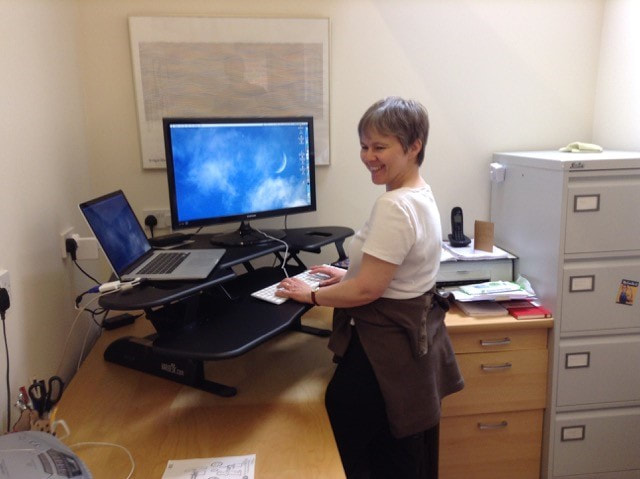
MELANIE THOMPSON: DEALING WITH DIGITAL WORKFLOWS FROM A STANDING DESK!
The ‘digital workflow’ is something we’re now all part of, whether we realize it or not. But clients are at different stages in their adoption (or not) of the latest tools and techniques, and that leaves us proofreaders in an interesting position.
We need to be able to adapt our working practices to suit different clients; ideally, seamlessly. For that, we need to understand what the current processes are, and what clients are planning for the future. And that’s where I need your help. A new research project: proofreading2020 I’ve launched a research project, proofreading2020, to investigate proofreading now and where it might be heading. 
The study begins with a survey, asking detailed questions about proofreading habits and preferences. Once the results are in, I’ll be conducting follow-up research for case studies and, early in 2019, publishing the results in book form.
You can find out more and complete the survey at proofreading2020. It's open now, and closes on 30 June 2018. Almost 200 proofreaders, project managers and publishers have already completed the survey. Several have contacted me to say it was really useful CPD, because it made them think about how they work and why they do things. So I hope you’ll be willing to set aside a tea-break to fill it in. It takes about 20 minutes to complete, but it’s easy to skip questions that aren’t relevant to you. There are only a handful of questions (at the beginning and end) that are compulsory (just the usual demographics and privacy permissions). Beyond that, the sections cover the following:
Your chance to join in!
Find out more and complete the survey at proofreading2020.
Don't forget, the closing date is 30 June 2018. * If a client does ask for BS symbols, I recommend downloading Louise’s free stamps for use on PDFs – they will save you a lot of time and help you deliver a neat and clear proof.
Melanie Thompson is an Advanced Professional Member of the Chartered Institute of Editing and Proofreading (CIEP) and a CIEP tutor.
Louise Harnby is a line editor, copyeditor and proofreader who specializes in working with crime, mystery, suspense and thriller writers.
She is an Advanced Professional Member of the Chartered Institute of Editing and Proofreading (CIEP), a member of ACES, a Partner Member of The Alliance of Independent Authors (ALLi), and co-hosts The Editing Podcast. Visit her business website at Louise Harnby | Fiction Editor & Proofreader, say hello on Twitter at @LouiseHarnby, connect via Facebook and LinkedIn, and check out her books and courses.
Here's a treat for PerfectIt users ... a custom style sheet that includes the find-and-replace strings in my free ebook, Formatting in Word.
If Formatting in Word has made your life easier, you'll love what my colleague Andrea Kay of Yours Truleigh Editing has done. Yep, she's upped the efficiency game for all of us by creating a custom style sheet that can be imported into PerfectIt.
Thank you so much, Andrea! For those unfamiliar with either the software or the booklet, I've provided an overview of both, and the benefits of importing the style sheet. Below that are the installation instructions and the ready-to-download files for Formatting in Word.
What's PerfectIt?
For those readers who are not familiar with this software, PerfectIt is a sophisticated consistency checker that works with Microsoft Word. By customizing its built-in style sheets, or creating your own, you can define your preferences and let PerfectIt locate variations and possible errors. I recommend every professional editor add it to their toolbox. You can read my more detailed review of the product here: PerfectIt 3 – must-have software for the editorial freelancing pro. If you don't yet have PerfectIt, contact Intelligent Editing for pricing and download information.
Ebook: Formatting in Word
This free ebook helps editors and self-publishing authors tidy up Word documents. In addition to showing you how to use some simple macros, it includes search strings to help you locate and fix potential problems, including rogue spaces at the beginning and end of paragraphs, double line returns, tabbed paragraph indents, lower-case letters at the beginning of paragraphs, paragraphs that end with no punctuation, and more.
What's the style sheet?
Andrea Kay just saved PerfectIt users a ton of time by building an importable custom style sheet that features the key search strings from the ebook! That means you don't have to manually type the strings into your Word document one by one, then repeat the process each time you work on a new document. Instead, import the style sheet, run PerfectIt, and let the software locate the potential problems for you. All you have to do is decide whether to implement the suggested change in your document. How to import your style sheet Importing the style sheet is a doddle, I promise, Follow the instructions and screenshots below. If PerfectIt is already installed, the process will take no longer than 20 seconds. 1. First, email me to get the style sheet.
2. Once you've installed PerfectIt, open the Word document you want to check.
3. Launch PerfectIt. 4. Click on Manage Styles. 
5. Click on the Import button.
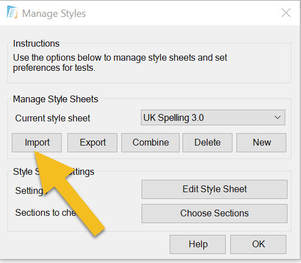
6. Select the pft from your device and click OK.
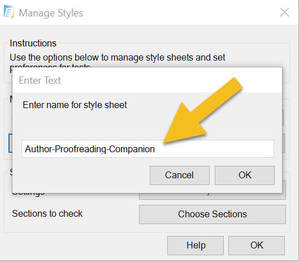
7. Click OK in the Manage Styles window.
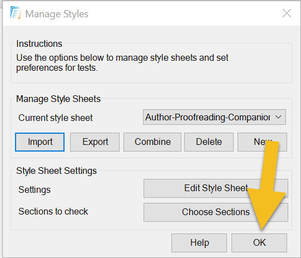
8. Select the your pft from the Current Style drop-down box.

9. To run PerfectIt on your current Word document using the custom style sheet, press Start.
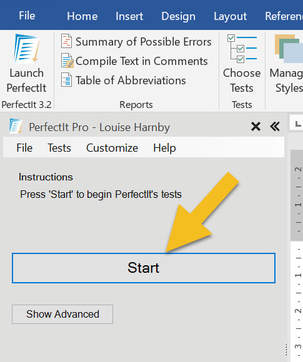
If you're not a PerfectIt user ...
If you're not yet ready to invest in PerfectIt but still want access to the find-and-replace strings and other tools in the ebook, click on the image below. 
Louise Harnby is a line editor, copyeditor and proofreader who specializes in working with crime, mystery, suspense and thriller writers.
She is an Advanced Professional Member of the Chartered Institute of Editing and Proofreading (CIEP), a member of ACES, a Partner Member of The Alliance of Independent Authors (ALLi), and co-hosts The Editing Podcast. Visit her business website at Louise Harnby | Fiction Editor & Proofreader, say hello on Twitter at @LouiseHarnby, connect via Facebook and LinkedIn, and check out her books and courses. |
PDF MARKUP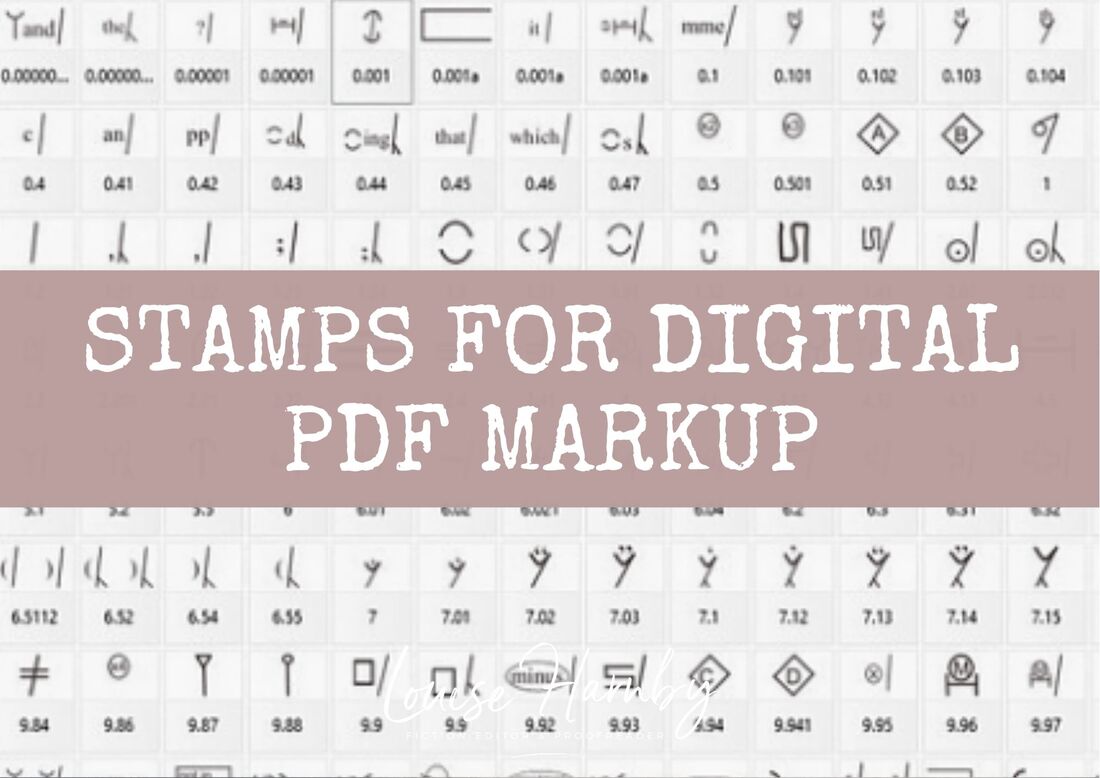
AUTHOR RESOURCES
EDITOR RESOURCES
TESTIMONIALSDare Rogers'Louise uses her expertise to hone a story until it's razor sharp, while still allowing the author’s voice to remain dominant.'Jeff Carson'I wholeheartedly recommend her services ... Just don’t hire her when I need her.'J B Turner'Sincere thanks for a beautiful and elegant piece of work. First class.'Ayshe Gemedzhy'What makes her stand out and shine is her ability to immerse herself in your story.'Salt Publishing'A million thanks – your mark-up is perfect, as always.'CATEGORIES
All
ARCHIVES
April 2024
|

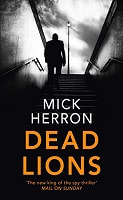
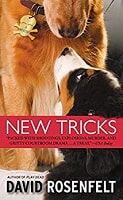
 RSS Feed
 |

|

|

|

|
|
|
|

© 2011–2024 Louise Harnby